
A 1080P AHD camera monitor kit is a simple industrial video system used when machine builders, maintenance teams and equipment integrators need real-time viewing and local recording without using a PC, IP network, cloud software or USB camera cable limitation.
For harsh machine monitoring, the main requirement is often not AI analysis. It is a clear local video view, a stable long cable connection and a DVR record that helps engineers understand what happened inside or around the equipment.
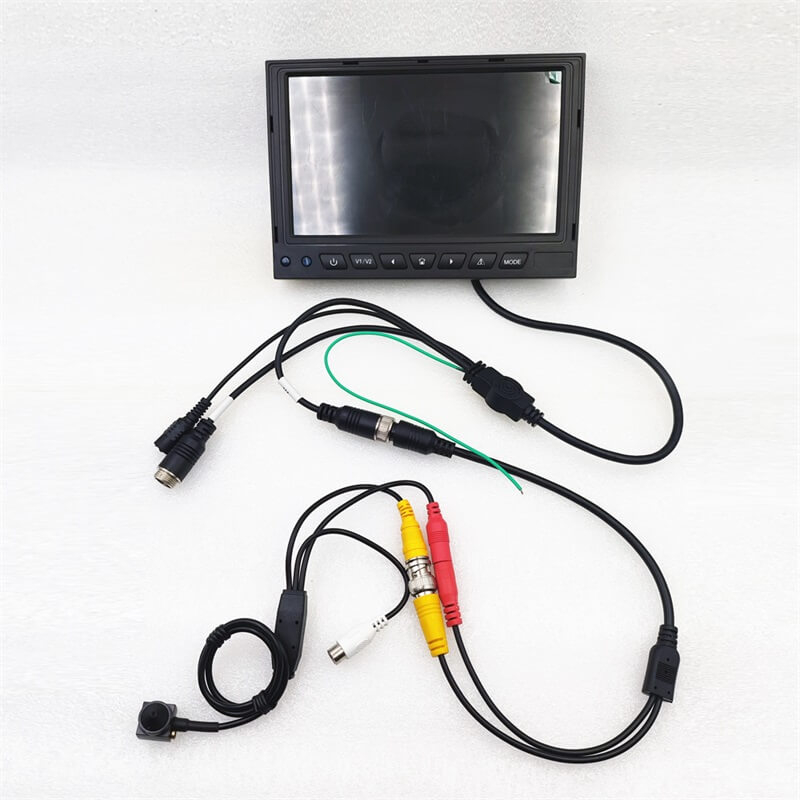
Goobuy’s Industrial AHD Camera Monitor DVR Kit is designed for this type of application. It combines a compact 1080P micro AHD camera with a 7-inch or 10-inch monitor DVR, allowing engineers to build a practical camera system for machine-side viewing, field service, fault diagnosis and protected harsh-site equipment monitoring.
Micro AHD Camera and DVR Monitor System for Machines, Control Cabinets, Heavy Equipment and Field Troubleshooting
AHD means Analog High Definition. An AHD camera system can send HD video over a coaxial-style cable to a local display or DVR monitor.
An AHD camera monitor kit normally includes:
Compared with an IP camera, an AHD system does not require IP address setup, network configuration or video management software. Compared with a USB camera, AHD is often easier for longer cable runs across machines, production lines, control cabinets and field equipment.
For many industrial users, that simplicity is the reason to choose AHD.
Modern factories and equipment systems often include PLCs, sensors, industrial PCs, cloud dashboards and edge AI devices. However, many maintenance problems still need direct visual evidence.
Engineers may need to know:
A local AHD camera monitor kit gives engineers a direct view of the machine and a DVR record for review. This is especially useful when the customer does not want a PC, software driver, IP camera setup or cloud account on site.
USB cameras and IP cameras are useful in many projects, but they are not always the simplest answer for machine monitoring.
AHD can be a better fit when the project needs:
In many industrial machines, the camera may be mounted inside the equipment while the monitor remains outside the machine, near the operator or inside a service position. In this type of layout, an AHD video link can be easier than USB and less complex than IP.
Machine enclosures often hide the most important mechanical events. Operators may not be able to see cutting areas, moving parts, material transfer, product jams or internal mechanisms directly.
A compact AHD camera can be installed inside a protected machine area and connected to a local monitor DVR outside the enclosure.
Typical applications include:
For these applications, the camera does not need to be a full networked surveillance system. It only needs to provide a real-time view and a local recording that helps engineers solve the problem.
Conveyors and production lines often have long routes, hidden transfer points and repeated fault positions. A small AHD camera can help operators and maintenance teams watch key points without standing close to moving equipment.
Possible uses include:
The DVR monitor is useful when the problem does not happen continuously. Engineers can record the machine running and replay the footage after a fault occurs.
This is one of the most practical advantages of a local DVR camera kit.
Some industrial equipment problems happen inside control cabinets, energy panels, pump stations or utility boxes. These areas may require visual checks but are not always convenient for direct observation.
An AHD camera monitor kit can be used for:
Because AHD can support long cable routing, the camera can stay near the equipment while the monitor remains in a more accessible position.
This type of setup is useful when real-time viewing and local recording are more important than remote network video.
Many machine areas are too narrow, dirty, hot, unsafe or inconvenient for direct human observation. A micro AHD camera can be installed close to the inspection point while the operator watches from a safer location.
Typical applications include:
For confined areas, camera size, lens angle and cable routing are more important than marketing specifications. The camera must physically fit the machine and provide the correct field of view.
AHD camera monitor kits can also be evaluated for protected operator-view applications on heavy equipment, forklifts, cranes, industrial vehicles and mobile machinery.
Possible uses include:
For mobile machinery, the camera and monitor must be selected carefully according to vibration, power supply, mounting position, weather exposure and cable protection. If the camera is directly exposed to rain, mud, washdown or strong vibration, a waterproof AHD camera option may be more suitable.
The standard micro AHD kit is best for protected or semi-protected machine integration, not for every outdoor vehicle condition.
Maintenance teams often need a portable or semi-fixed camera system for troubleshooting. They may not want to install software, configure IP cameras or connect to the customer’s network.
A micro AHD camera monitor DVR kit can be used as a field-service visual evidence tool.
Typical uses include:
This is especially useful when the problem is intermittent. The technician can record the process and review the exact moment when the fault happens.
Industrial sites often include motors, VFDs, welders, pumps, generators, RF equipment and long cable routes. These conditions can make wireless video or network camera setup more difficult.
AHD video over coaxial-style cable can be a practical option when the customer needs simple, stable and real-time video.
Typical locations include:
The final signal quality still depends on cable quality, shielding, grounding, connector quality, power stability and installation practice. But for many field projects, AHD is easier for technicians to understand and troubleshoot than a full IP camera network.

The Goobuy Industrial AHD Camera Monitor DVR Kit is built for OEMs, machine builders and industrial integrators who need a compact analog-HD camera and local recording monitor.
The system can include:
The product is suitable when the customer needs a practical visual evidence system rather than a complex smart camera platform.
In machine monitoring, live video alone is not always enough.
Many faults happen quickly. Operators may miss them. Maintenance teams may arrive after the problem has already stopped. Without video evidence, the discussion becomes guesswork.
A DVR monitor can support:
For many OEMs and service teams, the ability to record locally is the difference between “we think this happened” and “we can show what happened.”
|
Requirement |
AHD Camera Monitor Kit |
IP Camera |
USB Camera |
|
Local real-time viewing |
Strong |
Depends on network and compression |
Strong if close to PC |
|
Long cable routing |
Strong |
Strong with network infrastructure |
Limited |
|
No PC required |
Yes |
Usually needs network/NVR/app |
No |
|
No IP setup |
Yes |
No |
Yes |
|
Local DVR monitor |
Yes |
Needs NVR or software |
Needs PC/software |
|
Easy field service |
Strong |
Medium |
Medium |
|
Compact camera placement |
Strong |
Depends on camera |
Strong |
|
Best for machine troubleshooting |
Strong |
Sometimes too complex |
Good for short cable host systems |
The best choice depends on the machine architecture. AHD is strongest when the customer needs simple local display, long cable routing and DVR recording without network setup.
Choose a micro AHD camera monitor kit when your project needs:
It is especially suitable for industrial projects where a simple visual system is more valuable than a complicated smart video platform.
An AHD camera monitor DVR kit should not be selected blindly.
It may not be the best fit if your project needs:
For these cases, a USB camera, IP camera, thermal camera, rugged waterproof camera or custom machine vision module may be more suitable.
The correct choice depends on the machine, cable distance, recording requirement, environment and integration method.
Before selecting an AHD camera monitor kit, customers should define the application clearly.
Important questions include:
These details help Goobuy recommend the right camera, lens, cable, connector and monitor configuration.
A packaging machine builder needs to monitor a hidden transfer point where products occasionally jam. A compact AHD camera is installed near the transfer point, and the DVR monitor is mounted near the operator panel. The technician can view the process live and replay the fault.
A service engineer needs to document an intermittent fault inside customer equipment. Instead of bringing a laptop and USB camera, the engineer uses a small AHD camera and DVR monitor to record the machine cycle locally.
A utility equipment integrator needs a camera inside a panel and a monitor several meters away. The AHD link allows simple video transmission without network configuration.
A mobile machinery manufacturer needs a protected operator-view system for a blind zone or attachment area. A micro AHD camera and monitor DVR can be evaluated before designing a custom version.
An equipment manufacturer needs to see inside a narrow cavity where a larger camera cannot fit. A 15×15mm micro AHD camera provides a compact viewing point connected to a local monitor.
The 1080P AHD camera monitor kit remains a practical solution for machine monitoring because many industrial problems do not require a cloud system, AI model or IP network. They require a small camera, a stable cable and a local monitor with recording.
For machine enclosures, conveyors, control cabinets, heavy equipment, field service, confined spaces and electrically noisy industrial sites, an AHD camera monitor DVR kit can provide real-time viewing and useful video evidence with less setup complexity.
Goobuy’s Industrial AHD Camera Monitor DVR Kit gives OEMs and system integrators a compact platform that can be configured for camera size, lens, cable, connector, monitor and mounting requirements.
If your project needs simple real-time machine monitoring, local DVR recording or long cable AHD video for harsh-site equipment, send us your application, mounting position, cable length, monitor requirement, lens angle, environment and expected quantity.
Goobuy can help evaluate the right AHD camera monitor kit configuration for your machine or equipment system.
An AHD camera monitor kit is used for real-time video monitoring and local recording in machines, control cabinets, heavy equipment, conveyors, field-service tools and industrial equipment. It is useful when the customer needs a simple camera-to-monitor system without PC software, IP setup or cloud connection.
AHD is often simpler than IP when the project needs local video, long cable routing and DVR monitor recording without network configuration. IP cameras are powerful for remote network systems, but they may require IP setup, software, NVR configuration and more IT support. AHD is practical for technicians who need direct viewing and recording on site.
USB cameras are good when the camera is close to a computer or embedded host. AHD is better when the camera needs a longer cable run to a local monitor, especially in machines, production lines, heavy equipment or field-service applications where a PC is not required.
Yes. The DVR monitor can support local recording, playback and snapshots depending on configuration. This is useful for fault diagnosis, maintenance records, customer service reports, operator training and incident review.
Yes. A compact micro AHD camera is suitable for narrow machine areas, equipment interiors, inspection points behind covers and other tight integration spaces. The final configuration should confirm lens angle, focus distance, cable routing and mounting method.
It can be evaluated for protected operator-view applications on forklifts, cranes, industrial vehicles and mobile machinery. For direct rain, mud, washdown or strong vibration exposure, the camera housing, monitor mounting and cable protection should be carefully evaluated, and a waterproof AHD camera option may be needed.
AHD systems can support longer cable runs than USB, and some configurations may support very long coaxial distances under suitable conditions. In real industrial sites, cable quality, shielding, connectors, grounding, power routing and interference must be checked before batch deployment.
Please provide the application, camera mounting position, available space, cable length, monitor size, DVR recording requirement, lens angle, lighting condition, environment, connector type, power supply and expected quantity. Photos or drawings of the installation area are also helpful.
this Article is updated by Mr Art huang from shenzhen novel electronics limited in july 13th, 2026
Follow Me
Address:A615, 6F, Huachuangda Building, No107 Xinghua 1st Road, 43 District, Xinan street, Baoan, shenzhen, China 518101