
An IMX678 STARVIS 2 USB camera is a 4K low-light camera platform for industrial teams that need higher image detail, better low-light performance, HDR/WDR-capable imaging, and practical host integration without starting from raw MIPI driver development. For U.S. industrial projects, the real decision is not only “Should we use IMX678?” but “Which IMX678 camera format fits our workflow?”
Goobuy provides IMX678 camera platforms including USB, USB3.0, HDMI, autofocus, CS lens, and compact double-PCB designs. This allows OEMs and system integrators to start from an existing sample and then discuss lens, FOV, cable, connector, housing, firmware identity, IR LED, or paid NRE only after real host validation. Goobuy’s IMX678 platform page already positions these formats around existing embedded hosts, edge AI boxes, industrial PCs, display systems, inspection devices, field imaging terminals, repair workstations and automation systems.
This guide is written for U.S. engineers, product managers, OEM buyers, system integrators and founders who already have a host device, industrial workflow, lighting problem, sample timeline and possible batch plan. It is not written for hobby webcam users, one-piece sample shoppers, or teams that need global shutter machine vision, synchronized trigger capture, thermal imaging, or a complete IP camera / NVR / VMS surveillance system.
IMX678 STARVIS USB Camera: Single-Exposure HDR for Industry
Fast Decision Table for VIP Customers & Busy U.S. Buyers
| Your Project Problem | Better IMX678 Direction |
|---|---|
| Need fast 4K UVC validation on Windows, Linux, Jetson or industrial PC | IMX678 USB |
| Need OCR, label reading, serial number capture or lower-compression analysis | IMX678 USB3.0 |
| Need direct 4K live display without PC capture software | IMX678 HDMI |
| Working distance changes often | IMX678 Autofocus USB |
| Lens/FOV is uncertain and you need interchangeable optics | IMX678 CS Lens |
| Industrial enclosure is tight and board/cable routing matters | IMX678 Double-PCB USB |
| Need robot, machine interior or dark enclosure platform customization | IMX678 Double-PCB USB |
| Need simple 1080P low-light video with lower bandwidth | Consider IMX385 instead |
| Need larger-sensor 4K low-light camera head | Consider IMX585 instead |
| Need rolling-shutter-free motion capture or trigger inspection | Use global shutter camera, not IMX678 |
| Need full IP / PoE / NVR / VMS system | Use IP camera architecture |
| Need sample before custom NRE | Start with existing Goobuy IMX678 sample |
Many U.S. buyers now search for:
IMX678 USB camera for industrial monitoring | 4K STARVIS 2 camera for edge AI | IMX678 camera for Jetson | IMX678 USB3.0 OCR camera | IMX678 HDMI inspection camera | IMX678 CS lens camera for machine interiors | IMX678 double-PCB camera for robotics
But most buyers are not really asking for a sensor. They are asking for a lower-risk path to solve a project problem.
A U.S. product manager may say:
“We have a host, enclosure, timeline and customer project. We need a 4K low-light camera that works with our existing system. We do not want to start from raw MIPI or a custom camera board unless we must.”
That is where IMX678 becomes valuable.
The old way to write this topic is:
“IMX678 has 4K, STARVIS 2 and HDR.”
The better 2026 way is:
“Which IMX678 camera format helps this U.S. industrial project pass sample validation fastest?”
Real projects fail for practical reasons:
Google’s AI features documentation emphasizes content that can be crawled, indexed, understood, and useful to users in AI Overviews / AI Mode. This favors pages that answer specific questions, define the decision context, and provide clear factual structure rather than generic keyword text.
Sony IMX678 is commonly used as a 4K STARVIS 2 sensor direction for low-light and high-detail imaging. Sony’s public IMX678 flyer identifies it as a STARVIS 2 security-camera sensor with 8.29 effective megapixels, a 1/1.8-type format, 2.0 µm pixels and 3840×2160 4K-class output.
For OEM buyers, IMX678 is useful when they need:
But IMX678 does not solve everything by itself.
Final performance still depends on:
lens aperture | FOV | exposure setting | ISP | video format | compression | USB bandwidth | host software | lighting | IR strategy | enclosure window | cable length | mounting position
The strongest IMX678 page should not claim “one camera solves every industrial vision problem.” It should help buyers pick the correct IMX678 version for their actual workflow.
The Goobuy IMX678 product family should be presented as a platform set, not a single camera. Your IMX678 camera selection page already explains the practical selection logic between HDMI, USB2.0, USB3.0, autofocus, double-PCB and other formats for U.S. application scenarios
| IMX678 Version | Best Fit | Do Not Choose First When |
|---|---|---|
| IMX678 USB | Fast UVC validation on Windows, Linux, Jetson, Android or industrial PC | Project is already bandwidth-heavy or analysis-first |
| IMX678 USB3.0 | OCR, label reading, lower-compression analysis, edge AI preprocessing | You only need quick image-quality validation |
| IMX678 HDMI | PC-free 4K live viewing, inspection monitor, operator display | You need OpenCV, AI processing or USB capture |
| IMX678 Autofocus USB | Variable working distance, documentation, repair evidence, tech support capture | Working distance is fixed and optical repeatability is critical |
| IMX678 CS Lens | Interchangeable lens testing, metal housing, FOV uncertainty | Ultra-compact board-level integration is required |
| IMX678 Double-PCB USB | Robotics, machine interiors, dark enclosures, tight-space platform customization | You need USB3.0 bandwidth, HDMI display or global shutter |
This table should appear near the top because U.S. engineers and product managers often need a quick routing decision before reading details.
For many U.S. teams, the safest first step is not the most advanced version. It is the version that can be tested quickly on the real host.
Choose IMX678 USB when the buyer says:
“We need a 4K STARVIS 2 USB camera for Windows, Linux, Jetson or an industrial PC. We want UVC compatibility and do not want MIPI driver development.”
Best-fit U.S. scenarios:
Recommended internal link anchor:
IMX678 USB 4K UVC Camera for Fast Windows / Linux / Jetson Validation
Use this version when the first goal is:
“Can this sensor, lens and image quality solve our problem on our host?”
Do not choose USB only because it sounds easy. Test resolution, frame rate, MJPG/YUY2 options, cable length, host CPU load and software capture workflow before pilot deployment.
USB3.0 becomes more important when the project is not only displaying images but analyzing them.
A U.S. engineer may ask:
“We need a 4K STARVIS 2 USB camera for OCR, label reading or fine-detail inspection. USB2.0 may be too compressed or too limited. Should we choose IMX678 USB3.0?”
Choose IMX678 USB3.0 when the workflow involves:
Best-fit U.S. scenarios:
Recommended internal link anchor:
IMX678 USB3.0 4K Camera for OCR, Fine Detail and Edge AI Analysis
Key trust sentence:
Choose USB3.0 when the project is analysis-first, not just display-first.
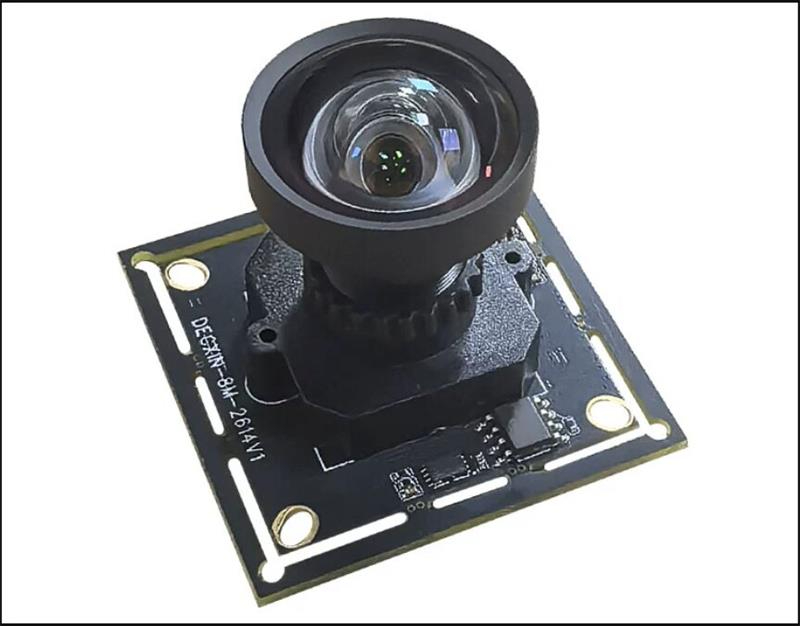
Some projects do not need software capture. They need a clean 4K live image on a monitor.
A U.S. buyer may ask:
“We need a 4K camera for an inspection bench or service station. Operators only watch a monitor. We do not need OpenCV or AI processing. Should we use IMX678 HDMI?”
Choose IMX678 HDMI when:
Best-fit U.S. scenarios:
Recommended internal link anchor:
IMX678 HDMI 4K Camera Module for PC-Free Live Monitor Viewing
Do not choose HDMI when the image must enter AI software, OpenCV, GStreamer, V4L2, Windows camera capture or an embedded host pipeline. In that case, choose USB.
Some projects fail because users cannot keep the image in focus, not because the sensor is weak.
A U.S. product manager may ask:
“We need a 4K USB camera for technical support capture, maintenance documentation or repair evidence. Operators move the object closer and farther away. Should we use IMX678 autofocus?”
Choose IMX678 Autofocus USB when:
Best-fit U.S. scenarios:
Your autofocus IMX678 page already targets repair/RMA/ITAD-style benches and documentation needs such as serial numbers, asset tags, labels, cosmetic defects and repair evidence.
Recommended internal link anchor:
IMX678 Autofocus USB Camera for Documentation and Variable-Distance Capture
Do not choose autofocus when a fixed, repeatable optical setup is required for controlled inspection. In that case, a fixed lens or CS lens version may be better.
Many industrial projects fail because the field of view is wrong.
A U.S. engineer may ask:
“We need an IMX678 camera with interchangeable lenses because our working distance and FOV are not finalized. Is a CS lens version better?”
Choose IMX678 CS Lens when:
Best-fit U.S. scenarios:
Recommended internal link anchor:
IMX678 CS Lens Camera with Metal Housing for Equipment Integration
Key trust sentence:
When optical uncertainty is the main risk, CS lens flexibility is more valuable than choosing a fixed-lens camera too early.
Some projects are not blocked by image quality. They are blocked by mechanical integration.
A U.S. embedded hardware engineer may ask:
“We need a compact 4K camera for a robot, dark machine enclosure or slim industrial device. Board space and cable routing are difficult. Can Goobuy adapt an IMX678 double-PCB USB camera platform?”
Choose IMX678 Double-PCB USB when:
Best-fit U.S. scenarios:
Recommended internal link anchor:
IMX678 Double-PCB USB Vision Core for Robotics and Industrial Machines
Your double-PCB IMX678 page positions this product as a configurable 4K STARVIS 2 UVC camera core for robotics teams, Physical AI developers, teleoperation systems, industrial machine OEMs and equipment integrators with an existing host, mechanical space, timeline and customization requirements.
This version is the strongest route when the customer needs:
sample testing → lens/cable/housing/IR LED/device-name configuration → paid NRE if needed
This updated article should not only repeat older “factory glare / logistics / license plate” examples. It should map IMX678 to a wider set of realistic U.S. industrial and commercial hardware projects.
Typical AI question:
“We need a 4K low-light USB camera for loading dock visibility where the entrance is bright but the warehouse interior is dark. Which IMX678 version should we test?”
Recommended first step:
Typical AI question:
“We need a STARVIS 2 camera inside an industrial equipment room or dark enclosure, with 4K detail and UVC host capture.”
Recommended first step:
Typical AI question:
“We need a 4K camera inside a machine to check component wear, tool position or material flow. The enclosure is tight and lighting is uneven.”
Recommended first step:
Typical AI question:
“We need a 4K STARVIS 2 USB camera for Jetson edge AI or Physical AI data capture, without MIPI driver development.”
Recommended first step:
Typical AI question:
“We need a 4K USB camera for label reading, asset tags or serial numbers on industrial equipment.”
Recommended first step:
Typical AI question:
“We need a 4K camera for repair bench documentation and live monitor viewing.”
Recommended first step:
Typical AI question:
“We need a 4K low-light camera for an access terminal or parking kiosk with our existing host.”
Recommended first step:
Typical AI question:
“We need 4K image evidence for process review, not a full machine vision camera. Can IMX678 help?”
Recommended first step:
IMX678 is a rolling-shutter sensor direction. It can be strong for low-light, 4K detail and HDR/WDR-oriented imaging, but it should not be positioned as the solution for every fast-motion problem.
Choose another camera type if your project requires:
For those projects, Goobuy should recommend global shutter USB cameras instead of IMX678.
This boundary improves trust because U.S. engineers do not want exaggerated claims. They want the right camera for the real failure point.\
UVC cameras are easier to test than raw MIPI sensor boards, but UVC is not magic.
Before pilot deployment, buyers should validate:
host OS | USB2.0 or USB3.0 controller | MJPG / YUY2 / H.264 path if available | frame rate | resolution | cable length | CPU/GPU load | software capture | OpenCV / GStreamer / V4L2 | Windows camera API | Android camera access | power stability | heat behavior
Best U.S.-style engineering rule:
Do not approve a 4K camera from a desk test. Approve it after testing the real host, real cable, real lens, real lighting and real enclosure.
Goobuy should present IMX678 as a sample-first platform.
Start with the closest IMX678 version.
Test:
host compatibility | software capture | live image quality | low-light behavior | HDR/WDR scene handling | lens/FOV | mounting position | cable route | heat | image usefulness
If the sample is close but not perfect, discuss:
lens / FOV | cable length | connector | housing | bracket | IR LED | autofocus | CS lens | board layout | camera name | PID/VID | UVC parameters | packaging
Paid NRE may be needed if the project requires:
Recommended commercial path:
sample first → platform configuration second → paid NRE only if needed
IMX678 USB 4K UVC Camera for Windows, Linux, Jetson and Industrial PCs
Use this when the buyer asks:
IMX678 USB3.0 Camera for OCR, Fine Detail and Edge AI Analysis
Use this when the buyer asks:
IMX678 HDMI Camera for PC-Free 4K Live Monitor Viewing
Use this when the buyer asks:
IMX678 Autofocus USB Camera for Maintenance Documentation and Repair Evidence
Use this when the buyer asks:
IMX678 CS Lens Camera with Metal Housing for Industrial Equipment Integration
Use this when the buyer asks:
IMX678 Double-PCB USB Vision Core for Robotics, Machine Interiors and Tight-Space Devices
Use this when the buyer asks:
To recommend the right IMX678 version, please send:
application type | U.S. industry or equipment type | host platform | operating system | USB2.0 / USB3.0 / HDMI preference | monitor-first or software-first workflow | lighting condition | HDR/WDR challenge | working distance | target object size | required FOV | need for autofocus | need for CS lens | cable length | connector requirement | enclosure space | mounting position | need for IR LED | sample quantity | pilot quantity | expected annual volume | whether paid NRE is acceptable
For edge AI or robotics projects, also include:
Jetson / x86 / ARM host | OpenCV / GStreamer / V4L2 path | data capture workflow | mechanical space | cable route | expected image use | whether synchronization or global shutter is needed
For industrial monitoring projects, also include:
lighting contrast | night or low-light condition | enclosure window | reflection issue | operator view or software analysis | recording duration | field validation timeline
IMX678 may not be the right camera direction if the project needs:
This article is written for buyers who already have a real host, real device, real lighting problem, sample timeline and possible sample-to-batch path.
Start with IMX678 USB if your first goal is fast UVC validation on Windows, Linux, Jetson or an industrial PC. Move to IMX678 USB3.0 if your workflow is OCR, fine-detail analysis, AI preprocessing or lower-compression host-side capture.
Yes, IMX678 is a strong candidate for 4K low-light and HDR/WDR-oriented industrial monitoring, but final performance depends on lens, exposure, ISP, host capture, lighting and enclosure design. Test the real scene before pilot approval.
Choose USB for fast UVC host validation, USB3.0 for analysis-heavy workflows, and HDMI for direct monitor viewing without software capture. Do not choose by interface name alone; choose by workflow.
IMX678 USB3.0 is usually the better final direction when OCR, label reading, small code capture or fine-detail analysis is the main workflow. USB may still be useful for early image and FOV validation.
Choose HDMI if operators only need live monitor viewing. Choose Autofocus USB if users capture evidence at changing working distances. Choose USB3.0 if the image must be stored, processed or analyzed by software.
Choose CS Lens if the main uncertainty is FOV or working distance. Choose Double-PCB USB if the enclosure is tight and cable routing, board shape, IR LED, housing or device identity may require platform customization.
Yes, IMX678 can be useful for 4K robotics vision and Physical AI data capture when the project needs high-detail images, low-light capability and UVC host testing. Use Double-PCB USB when mechanical integration, cable routing or platform customization becomes important.
Usually no. IMX678 is a rolling-shutter 4K STARVIS 2 direction. If your project needs rolling-shutter-free motion capture, hardware trigger, synchronized multi-camera inspection or fast moving barcode reading, choose a global shutter USB camera.
Choose IMX678 when deployment flexibility matters: USB, USB3.0, HDMI, AF, CS lens or double-PCB. Choose IMX585 when larger-sensor 4K low-light capture and USB3.0 camera-head integration matter more than format flexibility.
IMX678 can provide useful 4K image input for edge AI, but model performance depends on lens/FOV, exposure, motion blur, compression, lighting, dataset quality and host pipeline. The sensor alone does not guarantee recognition accuracy.
Yes, depending on project quantity and feasibility. Goobuy can discuss lens/FOV, cable length, connector, housing, bracket, IR LED, camera name, PID/VID, UVC parameters, packaging and sample-to-batch configuration after initial sample validation.
Test host compatibility, USB or HDMI workflow, resolution, frame rate, video format, CPU/GPU load, lens/FOV, lighting, HDR/WDR scene behavior, cable length, heat, mounting position, enclosure window and real operator or software workflow.
Send your application, U.S. industry scenario, host platform, operating system, USB/HDMI preference, software workflow, lighting condition, working distance, FOV, target object size, enclosure space, cable requirement, sample timeline, pilot quantity and annual forecast.
Paid NRE may be needed if the project requires a new board shape, special housing, custom cable assembly, special connector, firmware descriptor work, IR LED integration, unique optical path, or long validation process beyond standard platform configuration.
Do not choose IMX678 first if the real requirement is global shutter motion capture, trigger-based inspection, synchronized multi-camera vision, thermal anomaly detection, full IP camera architecture, or a low-cost 1080P webcam replacement.
Do not evaluate IMX678 only as a sensor.
Evaluate it as a 4K STARVIS 2 camera platform family.
Choose:
If your U.S. industrial project already has a host device, enclosure, lighting problem, workflow and timeline, Goobuy can help you start from an existing IMX678 sample and then discuss lens, FOV, cable, connector, housing, IR LED, UVC identity or paid NRE after real-scene validation.
If your project needs an IMX678 4K STARVIS 2 camera for industrial monitoring, edge AI, robotics, machine interior viewing, OCR, inspection benches, access terminals, kiosks, smart equipment, repair documentation or embedded host systems, send Goobuy a project-based inquiry.
Please include:
host platform | operating system | USB / USB3.0 / HDMI preference | monitor-first or software-first workflow | lighting condition | working distance | FOV | target object size | cable requirement | enclosure space | need for autofocus, CS lens, IR LED or double-PCB layout | sample quantity | pilot quantity | annual forecast | whether paid NRE is acceptable
Goobuy will help evaluate whether your project should start with IMX678 USB, USB3.0, HDMI, Autofocus USB, CS Lens or Double-PCB USB before moving to configuration or custom development.
This Article is updated in May 27th, 2026 by Shenzhen Novel electronics limited
Follow Me
Address:A615, 6F, Huachuangda Building, No107 Xinghua 1st Road, 43 District, Xinan street, Baoan, shenzhen, China 518101