
Hands-free POV recording on Android is a video workflow that uses a wearable external USB camera connected to a compatible Android phone or tablet through USB OTG. It lets technicians, inspectors and field-service users capture a first-person view while keeping both hands available for repair, inspection, maintenance, training and work documentation
Recording a repair, inspection or technical task with a smartphone can be difficult when both hands are needed for the work.
A practical alternative is to connect a wearable external USB camera to a compatible Android phone. With USB OTG support and a UVC camera app, the phone becomes the display and recording host while the external camera can be positioned closer to the operator's point of view.
This creates a simple hands-free setup:
Wearable POV Camera → USB-C OTG → Android Phone → UVC Camera App → Live View / Recording
For technicians, inspectors and field-service workers, the main advantage is not necessarily higher image resolution.
It is the ability to move the camera viewpoint away from the phone and closer to the work.
Modern smartphones already have excellent built-in cameras.
The problem in many professional tasks is not the camera itself.
Imagine a technician repairing a machine.
If the technician holds the phone:
Putting the phone on a tripod can solve part of the problem, but the camera then records the work from a fixed external position.
For some repair, inspection and training tasks, what is more useful is a viewpoint closer to what the operator is actually looking at.
That is where a wearable external camera can help.
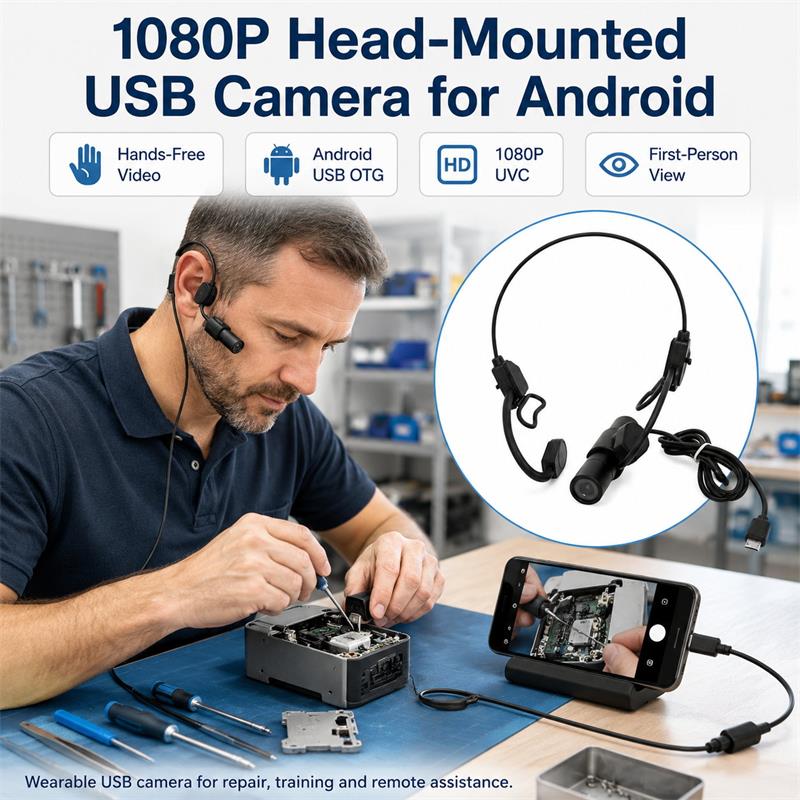
A wearable USB camera separates two functions that are normally combined inside a smartphone:
The Android phone remains the host, display and recording device.
The external camera becomes the movable viewpoint.
Instead of pointing the entire phone toward the work area, the camera can be positioned near the user's head while the phone stays in a pocket, on a workbench or in another convenient position.
This is the basic idea behind a hands-free Android POV camera setup.
Move the camera viewpoint from your phone to your work.
For many commercial applications, this positioning advantage can be more important than simply adding more megapixels.
A basic setup requires four components.
The camera should be small and light enough to wear comfortably while working.
Depending on the application, useful factors include:
For close repair and inspection work, the widest possible lens is not always the best choice.
The important question is whether the camera can clearly capture the actual working area at the user's normal viewing distance.
The Android device must be capable of acting as a USB host.
This is commonly referred to as:
USB OTG or USB Host Mode.
A USB-C connector alone does not guarantee that every Android device will work with every external USB camera.
Compatibility can depend on:
For commercial deployment, the actual phone and camera combination should therefore be tested before purchasing a larger quantity.
A standard USB camera normally requires an Android application capable of accessing an external UVC camera.
Depending on the application, the software may provide functions such as:
Live View
Video Recording
Photo Capture
Resolution Selection
Video Format Selection
Not every app provides the same functions.
More importantly:
A USB camera working correctly in a UVC camera app does not automatically mean that every Android application can use that camera.
For example, video conferencing, messaging or remote-support applications may handle external USB cameras differently.
If a specific third-party application is essential to your workflow, test that exact combination before deployment.
For a USB-C version of a wearable camera, the connection is typically:
Camera → USB-C → Compatible Android Device
The camera is powered through the USB connection, so a separate camera battery is not required in a normal wired configuration.
This can simplify field use because the user does not need to charge and manage another independent camera device.
However, the camera also draws power from the Android host, so long-duration use should be tested with the intended phone or tablet.
The basic process is straightforward.
Confirm that the intended Android phone or tablet supports USB OTG / USB Host operation.
Install an application designed to access an external USB camera.
Open the application before or after connecting the camera according to the app's normal workflow.
Connect the wearable USB camera to the Android device.
The Android system may ask for permission to allow the application to access the USB device.
Before wearing the camera, check:
If the image is not available, check the OTG setting, USB permissions and application compatibility before assuming there is a camera hardware problem.
Wear or mount the camera in its intended position.
For technical work, aim the camera toward the normal hand-working area rather than simply pointing it straight ahead.
Perform a short test using the actual object you will work on.
For example:
Check whether the important details remain visible when both hands enter the working area.
If the selected UVC application supports recording, start a short trial video.
Review the recording before using the system for an important inspection or service job.
This verifies not only camera operation but also:
camera angle + working distance + lighting + Android device + software + recording workflow.
The concept is useful when the operator needs both hands for the actual task while still capturing a first-person view.
A technician can record a maintenance procedure without continuously repositioning a phone.
This may help document:
Repair businesses may need visual records of what was found and what work was performed.
A wearable camera can provide a different perspective from a fixed workshop camera because the viewpoint follows the technician more closely.
For inspections involving cabinets, equipment interiors, machinery or difficult viewing positions, moving the external camera separately from the phone can make positioning easier.
A wearable POV camera is not a replacement for a true borescope or microscopic inspection system.
It is better suited to work areas that remain visually accessible but are inconvenient to record with a handheld phone.
Experienced technicians can record procedures from a first-person perspective for:
The viewer can see the work from a perspective closer to the person performing the procedure.
A hands-free camera can also provide a useful external viewpoint during demonstrations.
However, if live video must be transmitted through specific meeting or remote-assistance software, verify that software workflow separately.
Do not assume that every Android application can directly select an external USB camera.
The two approaches are not direct substitutes.
|
Feature |
Smartphone Camera |
Wearable USB POV Camera |
|
Image quality |
Often excellent |
Depends on camera |
|
Camera position |
Fixed to phone |
Separate from phone |
|
Hands-free use |
Requires phone mounting |
Designed for wearable positioning |
|
Display |
Phone |
Android phone |
|
Recording |
Native phone camera app |
Compatible UVC app |
|
Additional battery |
No |
Normally USB-powered |
|
First-person work view |
Difficult with handheld phone |
More practical |
|
Cable |
None |
Required |
|
App compatibility |
Excellent with native camera |
Must be verified |
A smartphone may still be the better choice when the highest image quality, wireless operation or simple general-purpose recording is required.
A wearable USB camera becomes interesting when camera position and hands-free operation are the main problem.
Goobuy UC-510-EAR is a compact ear-worn USB camera designed to provide a hands-free external camera viewpoint for compatible Android devices.
Instead of replacing the Android phone, UC-510-EAR uses the phone as the host.
The basic workflow is:
UC-510-EAR → Android OTG Device → Compatible UVC App
This makes it suitable for evaluating applications such as:
The product is intended for customers who already have an Android-based workflow and want to move the camera viewpoint closer to the work.
Android is a large and diverse hardware ecosystem.
For this reason, professional buyers should not evaluate an external camera only by checking whether it has a USB-C connector.
A proper test should include:
Camera
Actual Android Device
Android Version
UVC Application
Required Resolution / Frame Rate
Actual Working Distance
Real Work Task
This is especially important for businesses planning to equip multiple technicians with the same camera setup.
A small initial sample test is usually more useful than making assumptions from specifications alone.
For field-service companies, repair businesses or technical teams, a practical evaluation process can be:
Step 1 — Select the Android phone or tablet already used by the team
↓
Step 2 — Confirm OTG and UVC camera operation
↓
Step 3 — Test UC-510-EAR in the real working environment
↓
Step 4 — Evaluate camera angle, working distance and recording quality
↓
Step 5 — Confirm whether the workflow is practical for technicians
↓
Step 6 — Expand to a small team deployment if testing is successful
This approach avoids unnecessary system development.
The objective is simple:
Use an existing Android device, add an external camera viewpoint, and verify whether it improves an existing work process.
Yes, a compatible Android device can access an external UVC camera through USB OTG when used with suitable software. Recording capability depends on the specific UVC application, Android device and camera configuration.
No universal compatibility should be assumed. The Android device should support USB OTG / USB Host operation, and the camera must be accessed through compatible software. Goobuy recommends testing the intended phone model before larger deployment.
The main advantage is camera position. UC-510-EAR allows the external camera viewpoint to move away from the phone and closer to the user's working perspective while keeping both hands available.
The wired USB camera is powered through the compatible USB host connection. Actual power consumption and phone battery life should be evaluated for longer working sessions.
It can be evaluated for hands-free recording of repair, maintenance, inspection and technical work where its working distance, field of view and Android compatibility meet the application's requirements.
Do not assume direct compatibility. An external USB camera may work in a UVC camera application while another Android application may not allow the user to select it as a video source. The exact software workflow should be tested.
No. It is better understood as a compact wired external USB camera that uses a compatible Android device as its host. Customers needing a completely wireless, self-powered standalone recorder may be better served by an action camera.
Yes. Goobuy can support small sample evaluation so customers can verify Android compatibility, camera position and the actual work-recording workflow before considering a larger quantity.
If your company is evaluating a hands-free camera for field service, repair, inspection or technical training, the most useful first step is not simply comparing camera specifications.
Test the camera with:
your Android device + your software + your actual work task.
Goobuy UC-510-EAR can be supplied for initial sample evaluation before small-batch deployment.
2pcs sample evaluation available.
10pcs / 30pcs small-batch pricing available.
For compatibility evaluation, send us your:
Android phone/tablet model + Android version + intended application + working distance + required use case.
We can first determine whether the existing UC-510-EAR configuration is appropriate for your workflow.
Follow Me
Address:A615, 6F, Huachuangda Building, No107 Xinghua 1st Road, 43 District, Xinan street, Baoan, shenzhen, China 518101