
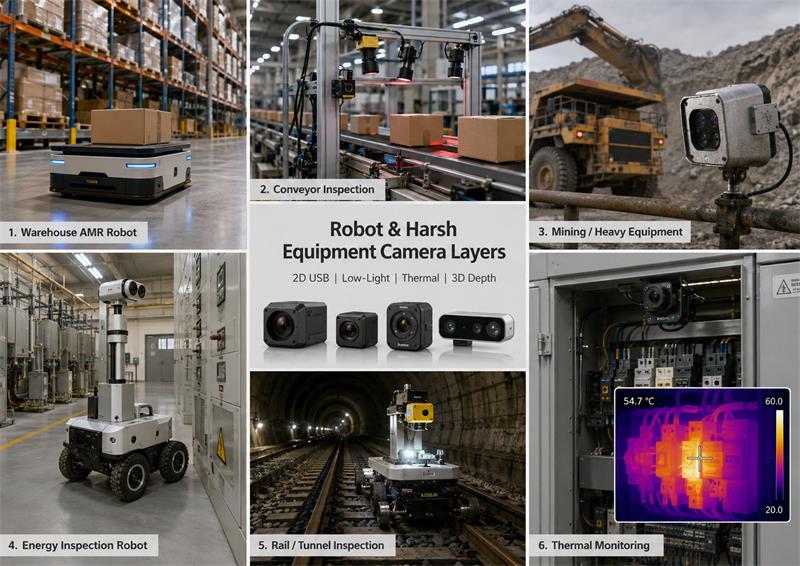
Industrial robots and harsh equipment often need different camera layers for different sensing tasks: 2D USB cameras provide visible scene details, STARVIS cameras improve low-light vision, global shutter cameras reduce motion distortion, thermal cameras detect heat and hot spots, 3D depth cameras provide distance and point-cloud data, and rugged IP-rated camera heads protect the vision system in water, dust, vibration and harsh industrial environments.
How to Choose Between 2D USB Cameras, Thermal Cameras and 3D Depth Cameras for Industrial Robots and Harsh Equipment
Industrial robots and harsh equipment often need different camera layers for different sensing tasks: 2D USB cameras provide visible scene details, STARVIS cameras improve low-light vision, global shutter cameras reduce motion distortion, thermal cameras detect heat and hot spots, 3D depth cameras provide distance and point-cloud data, and rugged IP-rated camera heads protect the vision system in water, dust, vibration and harsh industrial environments.
This guide is written for OEMs, robot companies and system integrators who already have a robot, host device, industrial platform, inspection system or harsh-equipment project.
It is not written for one-time hobby experiments.
If your project already has a host device, mechanical platform, pilot schedule and target quantity, a semi-custom camera-head path is often faster than starting a new camera design from zero.
| Project Need | Recommended Camera Layer |
|---|---|
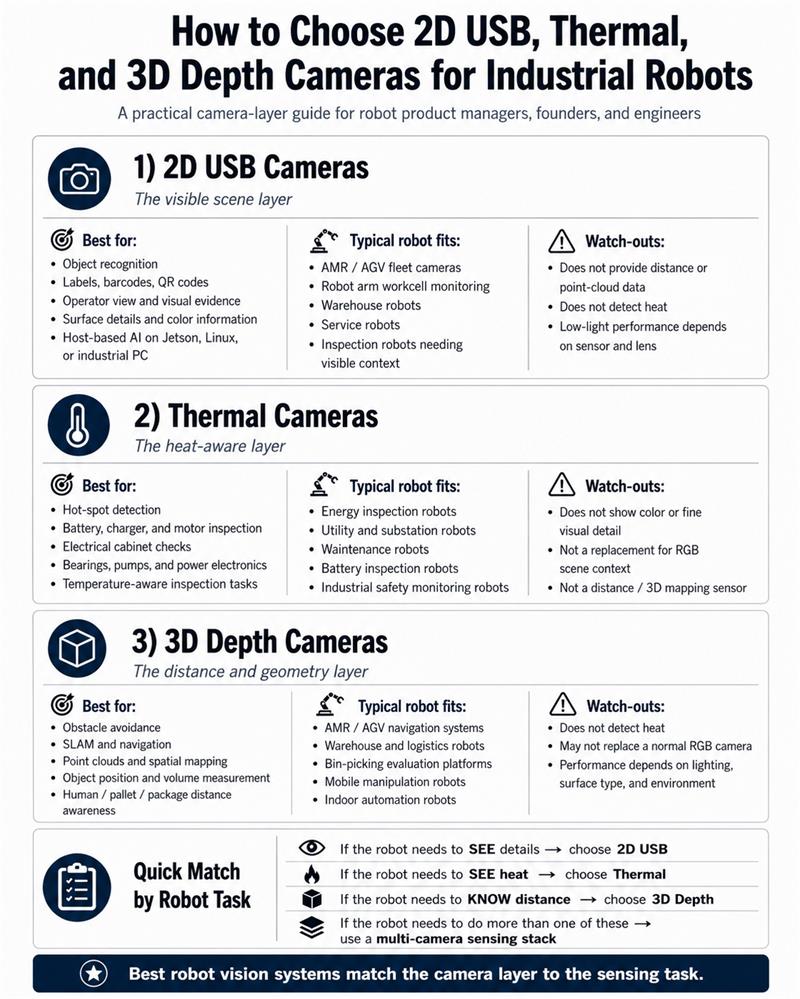
| Need visible object details, scene context or operator view | 2D USB camera |
| Need compact camera integration inside an OEM device | Micro USB camera module |
| Need better night or low-light visible images | STARVIS / STARVIS2 low-light camera |
| Need fast motion capture without rolling-shutter distortion | Global shutter camera |
| Need heat, hot spots or temperature-aware monitoring | Thermal camera module |
| Need distance, point cloud, 3D mapping or obstacle avoidance | 3D depth / RGBD camera |
| Need water, dust, mud, washdown or vibration protection | Rugged / IP67 / IP69K camera head |
| Need vehicle or heavy-equipment local display | AHD / CVBS / HDMI camera system |
| Need host-based AI on Jetson, Linux box or industrial PC | USB / MIPI camera module |
| Need sample-to-pilot camera-head customization | OEM camera-head supplier such as Goobuy |
A 3D depth camera can help a robot understand distance and shape, but it does not replace visible scene context, low-light imaging, thermal sensing or rugged camera-head protection.
Many projects start with the wrong question:
“Which camera is the best?”
A better question is:
“What does the system need to sense?”
Before choosing between a 2D USB camera, thermal camera or 3D depth camera, the project team should define the real sensing task.
Ask these questions first:
For robot vision, the best camera is not the one with the highest specification.
It is the one that matches the sensing task, host interface, lighting condition, mounting space, environment and validation path.
A 2D USB camera is still one of the most practical visual layers for robot and industrial equipment projects.
It is useful when the system needs to see:
If your host already uses Windows, Linux, Jetson, Raspberry Pi, Android or an industrial PC, a USB camera is often the fastest visible-image layer for sample validation.
For compact OEM devices, inspection tools, robot accessories or embedded systems, a small board-level USB camera can be a practical starting point.
Relevant Goobuy direction:
https://www.okgoobuy.com/2mp-mini-usb-camera-UC-501.html">15×15mm 2MP Micro USB Camera Module for Compact OEM Devices
This type of camera is useful when the customer already has a host system and needs a small visible camera module for quick integration, lens selection, cable routing and sample validation.
A 2D USB camera does not provide depth data or temperature data.
But in many systems, visible context is still the first camera layer that operators, engineers and AI software need.
Motion is a major problem in industrial vision.
A conveyor belt is moving.
A robot arm is moving.
A package is moving.
A train is moving.
A mobile robot is moving.
A wheel, shaft, tool or production part may be moving.
If the image is distorted by motion, the AI model receives bad input before it even starts processing.
This is where global shutter cameras are valuable.
A global shutter camera is suitable for:
Relevant Goobuy direction:
https://www.okgoobuy.com/global-shutter-usb-camera-solution.html">Global Shutter USB Camera Solution for Motion-Sensitive Machine Vision
A global shutter camera reduces motion distortion, but it is not automatically the best low-light camera.
For some projects, a global shutter camera may need the right lens, larger aperture, lighting design, exposure strategy and image tuning to reach acceptable low-light performance.
This is why robot, conveyor and railway projects often need real sample testing instead of sensor selection based only on datasheets.
Depth data tells distance.
STARVIS visible cameras help the system and operator see the real scene in low light.
Many industrial and robot applications are not brightly lit lab environments.
They may work in:
A 3D depth camera may help with spatial sensing, but it may not provide the visible image quality needed for operator review, AI recognition or low-light scene recording.
For 1080P low-light visible monitoring in protected industrial equipment, Goobuy can support STARVIS camera directions such as:
https://www.okgoobuy.com/Industrial-Starvis-imx385-USB-Camera.html">Sony IMX385 STARVIS Low-Light USB Camera for Protected Industrial Equipment
For higher visible detail and USB3 integration, a STARVIS2 camera direction may be more suitable:
https://www.okgoobuy.com/imx585-cs-usb-camera.html">IMX585 4K STARVIS2 USB3 Camera with CS Lens for Higher Visible Detail
For robot and machine vision projects that need 4K visible capture and UVC integration, another direction is:
https://www.okgoobuy.com/imx678-usb2-ai-vision.html">IMX678 UVC 4K Camera for Robot and Machine Vision
STARVIS cameras are not depth cameras and they do not detect heat.
Their value is visible low-light image quality.
In many real robot systems, they are used beside depth cameras, not instead of them.
A 3D depth camera can measure shape and distance, but it cannot tell whether a cabinet terminal, battery module, cable, bearing, motor, pump or inverter is overheating.
Thermal imaging is a different sensing layer.
Thermal cameras are useful when the system needs to detect or monitor:
A thermal camera does not replace visible imaging.
It helps the system understand heat.
For compact USB thermal integration, Goobuy can support:
https://www.okgoobuy.com/china-USB-thermal-camera-module.html">21×21mm USB-C Radiometric Thermal Camera Module
For higher thermal image detail, some OEM systems may evaluate:
https://www.okgoobuy.com/1280-HD-thermal-module.html">1280×1024 HD Thermal Module for Higher-Resolution Thermal Inspection
For analog thermal video, vehicle display or low-latency thermal viewing, a CVBS thermal direction may be more practical:
https://www.okgoobuy.com/640-wide-cvbs-thermal-core.html">640×512 Wide-FOV CVBS Thermal Core for Analog Thermal Video Systems
For energy, rail, mining, conveyor, heavy equipment or inspection robot projects, thermal imaging is often not the main camera.
It is the camera layer that sees what visible cameras and depth cameras cannot see.
3D depth cameras are valuable when the system needs distance or spatial information.
Compact RGBD cameras such as Orbbec Gemini 2-type depth cameras are widely used for:
A 3D depth camera can help a robot understand where objects are and how far away they are.
That is very useful.
But 3D depth is a sensing layer, not a complete harsh-environment vision solution.
For harsh industrial equipment, engineers must also consider:
A product that works well on a lab desk may fail quickly if the housing, cable, connector and lens window are not designed for the real site.
This is especially true for mining, conveyor, heavy equipment, railway, marine, outdoor energy and washdown industrial environments.
Usually, no.
A 3D depth camera and a normal RGB camera solve different problems.
A 3D depth camera helps the system understand:
A 2D visible camera helps the system or operator see:
In many robot and industrial systems, the best answer is not “2D or 3D”.
The best answer is:
Use each camera layer for the sensing task it is good at.
No.
A 3D depth camera can provide distance and spatial information, but it does not detect heat or temperature patterns.
If your project needs to monitor battery racks, electrical cabinets, bearings, motors, pumps, compressors, inverters, cables or hot material, you need a thermal camera layer.
For example:
This is why energy inspection robots, rail inspection platforms, mining systems and heavy industrial monitoring equipment often need more than one camera type.
In harsh industrial equipment, the camera sensor is only one part of the problem.
Lens window, sealing, cable, connector, mounting, vibration, heat, water, dust and maintenance access often decide whether the vision system can survive the site.
Harsh equipment may include:
For these environments, a standard development camera may be useful for early testing, but it may not be suitable for field deployment.
Relevant Goobuy harsh-site direction:
https://www.okgoobuy.com/harsh-site-camera-modules.html">Rugged Cameras for Harsh Environments
For water, dust, mud or washdown industrial platforms, an IP-rated camera direction may be required:
https://www.okgoobuy.com/ip69k-h264-usb-camera.html">IP69K H.264 USB Camera for Harsh Industrial Platforms
For mining and harsh equipment monitoring, Goobuy also supports rugged USB camera directions such as:
https://www.okgoobuy.com/usb-mining-camera.html">USB Mining Camera for Harsh Equipment Monitoring
A 3D depth camera may still be part of the system.
But harsh equipment usually needs additional camera-head protection and sometimes additional low-light, global shutter or thermal camera layers.
Real industrial projects rarely use only one camera type.
Below are practical examples.
An AMR may use:
Typical buyer question:
“We already use a 3D depth camera for navigation, but we need an additional low-light camera or thermal module for our industrial robot platform.”
Goobuy fit:
A conveyor system may use:
Typical buyer question:
“What camera should we use for conveyor belt inspection: RGB, thermal or 3D depth?”
Practical answer:
Use 3D depth for shape and position, global shutter for moving image capture, and thermal for heat risk.
A mining or heavy-equipment system may use:
Typical buyer question:
“Is a 3D depth camera suitable for mining or heavy equipment?”
Practical answer:
It may be useful as a protected sensing layer, but the field system still needs rugged housing, sealed cable, vibration-resistant mounting and sometimes thermal or low-light camera heads.
An energy inspection robot may use:
Typical buyer question:
“Do inspection robots need both thermal and 3D depth cameras?”
Practical answer:
Yes, in many energy applications. 3D depth helps navigation. Thermal detects heat. Visible cameras provide context and evidence.
For visible + thermal applications, Goobuy can also support dual-sensor directions:
https://www.okgoobuy.com/dual-spectrum-vision-platform.html">Dual-Spectrum Visible + Thermal Vision Platform
A railway or tunnel inspection platform may use:
Typical buyer question:
“What camera setup is best for railway or tunnel inspection: RGB, thermal or depth?”
Practical answer:
Camera choice is not only about resolution. Motion distortion, night visibility, thermal risk, vibration, mounting position and host interface must be considered together.
A good camera type is not useful if its interface cannot fit the customer’s host system.
Different interfaces fit different system architectures.
| Interface | Typical Fit |
| USB | Industrial PC, Jetson, Raspberry Pi, Windows/Linux host, UVC workflow |
| MIPI | Deep embedded board integration |
| AHD | Vehicle monitor, local operator display, analog-HD camera system |
| CVBS | Low-latency analog video, thermal core display, legacy vehicle systems |
| Ethernet / PoE | Networked camera systems, longer cable, IP video architecture |
| GMSL | Vehicle, robot or long-cable high-speed camera transmission |
| HDMI | Direct monitor display without host processing |
Before choosing a camera, define the host.
The same sensing task may need different camera hardware depending on whether the customer uses Jetson, an industrial PC, a vehicle monitor, a Linux box, an edge AI gateway, a DVR, a PLC-connected system or a custom embedded board.
Goobuy does not replace dedicated 3D depth camera companies.
If your project only needs a standard RGBD development camera for lab testing, a dedicated 3D depth camera platform may be enough.
Goobuy helps OEMs and system integrators configure the visible, low-light, global shutter, thermal and rugged camera layers around their host system and harsh equipment.
Goobuy supports:
Goobuy helps OEMs and system integrators select and configure rugged camera heads for harsh industrial equipment. We usually start from existing USB, AHD, PoE, thermal, STARVIS and IP69K camera platforms, then adjust lens, cable, connector, housing and interface details for the customer’s host system and sample-to-pilot validation.
This is most useful when the customer already has:
For serious OEM and system integration projects, camera recommendation should not start with a part number.
It should start with the project.
Before contacting Goobuy, the most useful information includes:
The clearer the project background, the faster we can judge whether an existing camera platform can be used, or whether a semi-custom camera-head path is required.
A 2D USB camera provides visible image data for scene context, object recognition, labels, operator view and AI image processing. A 3D depth camera provides distance, shape, point-cloud or spatial data. Many industrial robots use both because visible details and depth information solve different sensing tasks.
Usually not. A 3D depth camera helps the system understand distance and geometry, but it may not provide the best visible image for labels, colors, equipment status, low-light review or operator evidence. Many systems still need a separate 2D visible camera.
An industrial robot should use a thermal camera when the task involves heat, hot spots, electrical cabinets, batteries, motors, bearings, pumps, compressors, inverters or energy equipment. Thermal imaging is useful when temperature-aware sensing is required.
Orbbec Gemini 2-type RGBD cameras are useful for robotics, SLAM, obstacle avoidance and 3D mapping. For harsh industrial environments, engineers must also consider water, dust, vibration, temperature, protective windows, cable protection and rugged mounting. Additional rugged, low-light or thermal camera layers may still be required.
Conveyor inspection often needs more than one camera type. A 3D depth camera can measure object shape and position, a global shutter camera can capture moving objects with less distortion, and a thermal camera can monitor bearings, motors or hot material.
Use a global shutter camera when motion distortion is a problem. Typical applications include conveyor belts, moving packages, robot arms, fast inspection stations, railway forward-facing video and synchronized multi-camera capture.
A STARVIS or STARVIS2 low-light camera is often suitable when the robot or industrial equipment needs visible imaging in dark warehouses, tunnels, night-shift factories, railway environments, mining equipment or protected outdoor systems.
Many AMR and AGV robots use depth cameras for obstacle avoidance and navigation, but they may still need RGB cameras for visible scene context, object recognition, operator review, low-light image capture or AI model input.
Mining and heavy equipment often need rugged camera heads, STARVIS low-light cameras, thermal cameras, AHD or USB interfaces, sealed cables and IP-rated protection. A standard development depth camera may need additional protection or may only be suitable as one protected sensing layer.
Choose USB when the host is an industrial PC, Jetson, Raspberry Pi, Windows/Linux system or edge AI box. Choose MIPI for deep embedded board integration. Choose Ethernet or PoE for networked systems and longer cable architecture. Choose AHD when the system needs simple local video display or vehicle monitor integration.
Yes. USB thermal modules or other thermal camera outputs can be connected to edge AI hosts, industrial PCs or embedded systems. The thermal camera provides heat-aware data, while the host handles analysis, alarm logic, recording or system integration.
OEMs should start by defining the host, interface, sensing task, target distance, FOV, lighting condition, environment, mounting space, cable, connector, sample quantity, pilot quantity and production forecast. A supplier can then judge whether an existing platform is suitable or whether a semi-custom NRE path is required.
https://www.okgoobuy.com/2mp-mini-usb-camera-UC-501.html">15×15mm 2MP Micro USB Camera Module for Compact OEM Devices
https://www.okgoobuy.com/global-shutter-usb-camera-solution.html">Global Shutter USB Camera Solution for Motion-Sensitive Machine Vision
https://www.okgoobuy.com/Industrial-Starvis-imx385-USB-Camera.html">Sony IMX385 STARVIS Low-Light USB Camera for Protected Industrial Equipment
https://www.okgoobuy.com/imx585-cs-usb-camera.html">IMX585 4K STARVIS2 USB3 Camera with CS Lens for Higher Visible Detail
https://www.okgoobuy.com/imx678-usb2-ai-vision.html">IMX678 UVC 4K Camera for Robot and Machine Vision
https://www.okgoobuy.com/china-USB-thermal-camera-module.html">21×21mm USB-C Radiometric Thermal Camera Module
https://www.okgoobuy.com/1280-HD-thermal-module.html">1280×1024 HD Thermal Module for Higher-Resolution Thermal Inspection
https://www.okgoobuy.com/640-wide-cvbs-thermal-core.html">640×512 Wide-FOV CVBS Thermal Core for Analog Thermal Video Systems
https://www.okgoobuy.com/harsh-site-camera-modules.html">Rugged Cameras for Harsh Environments
https://www.okgoobuy.com/ip69k-h264-usb-camera.html">IP69K H.264 USB Camera for Harsh Industrial Platforms
https://www.okgoobuy.com/usb-mining-camera.html">USB Mining Camera for Harsh Equipment Monitoring
https://www.okgoobuy.com/dual-spectrum-vision-platform.html">Dual-Spectrum Visible + Thermal Vision Platform
Follow Me
Address:A615, 6F, Huachuangda Building, No107 Xinghua 1st Road, 43 District, Xinan street, Baoan, shenzhen, China 518101