
USB Camera vs AHD Camera: Which One Should You Choose?
USB cameras and AHD cameras are both widely used in video devices, camera modules, embedded systems, DVR kits and small equipment projects. They may look similar from the outside, but they are designed for different system architectures.
A USB camera is usually selected when the camera needs to connect directly to a computer, embedded host, Android device, Linux system, Windows PC, Raspberry Pi, Jetson board or software application.
An AHD camera is usually selected when the camera needs to connect to an AHD DVR, analog-HD monitor, RCA / BNC video input or coaxial cable video system.
The best choice depends on the host device, cable distance, recording method, software requirement, latency expectation, installation space and final application.
This guide explains the practical difference between USB cameras and AHD cameras so product developers, buyers and engineers can choose the right camera interface before ordering samples.
Choose a USB camera if your system needs:
Choose an AHD camera if your system needs:
In simple words:
USB is better for software integration.
AHD is better for DVR / monitor video systems.
A USB camera is a digital camera that sends video data through a USB interface.
Many USB camera modules support UVC, which means the camera can be recognized by common operating systems without a custom driver in many basic video applications.
Typical USB camera hosts include:
USB cameras are commonly used when the system needs software-side video.
Typical applications include:
The main advantage of USB is that it is easy to connect to software.
AHD means Analog High Definition. An AHD camera outputs analog-HD video through a video cable, usually to an AHD DVR, AHD monitor or analog-HD display system.
Typical AHD camera systems include:
AHD cameras are commonly used when the system needs direct video display or DVR recording without a computer.
Typical applications include:
The main advantage of AHD is that it is simple for video display and DVR recording.
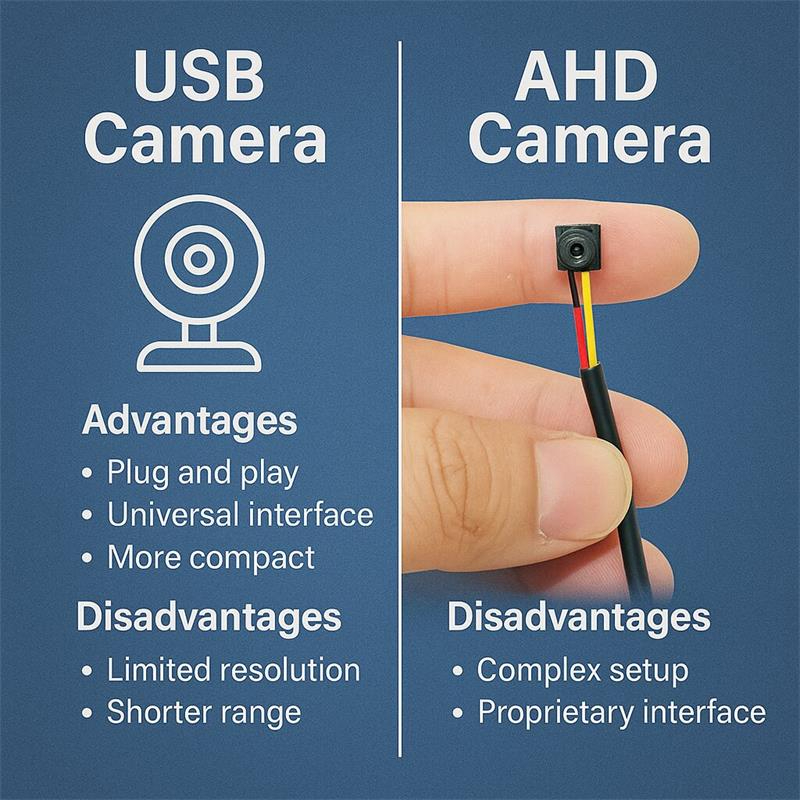
The biggest difference is not image quality. The biggest difference is the system architecture.
A USB camera sends digital video data to a host computer or embedded system.
An AHD camera sends analog-HD video to a DVR or monitor.
| Feature | USB Camera | AHD Camera |
|---|---|---|
| Main purpose | Software video input | DVR / monitor video output |
| Signal type | Digital USB video | Analog-HD video |
| Typical host | PC, Linux, Android, Jetson, Raspberry Pi | AHD DVR, AHD monitor, RCA / BNC input |
| Driver | Often UVC plug-and-play | No PC driver required |
| Software processing | Strong | Requires capture / conversion |
| Local monitor display | Needs host or USB-to-display workflow | Direct to AHD monitor |
| DVR recording | Needs PC / software / recorder | Direct to AHD DVR or monitor DVR |
| Cable distance | Shorter in normal passive cable use | Longer with suitable video cable |
| Power | Often through USB | Usually separate power |
| Best fit | Embedded software systems | Local video and DVR systems |
This is the core selection rule.
If the video must go into software, choose USB.
If the video must go to a monitor or DVR, choose AHD.
USB cameras are easy to use with software platforms. Many UVC USB cameras can work with common video applications and development tools.
This is useful for:
For software developers, USB is usually the fastest way to start testing camera input.
A USB camera can usually receive power and transmit video through the same cable. This reduces wiring complexity in compact devices.
This is useful for:
If the camera image needs to be processed by software, USB is usually more convenient than AHD.
USB cameras are suitable for:
Depending on firmware and sensor support, USB cameras may allow software control of:
This is useful when the camera is part of a product that needs software tuning.
USB is not ideal for long passive cable runs. Standard passive USB cable length is usually much shorter than coaxial video cable.
Active USB cables, powered hubs, USB extenders or Ethernet-based USB extension can increase distance, but they add cost and system complexity.
For simple long-distance camera-to-monitor video, AHD may be easier.
A USB camera normally needs a host device. It cannot usually connect directly to a normal monitor or DVR without a USB host or converter.
This means the system may need:
If the project only needs a local monitor view, USB may be more complicated than AHD.
High-resolution USB cameras can use a lot of bandwidth. Multiple USB cameras on the same host may need careful planning.
Important factors include:
For multi-camera systems, USB can work, but the architecture must be designed carefully.
AHD cameras are often selected when the camera must be installed farther from the monitor or DVR than a standard USB cable would allow.
With suitable coaxial cable, connectors and DVR compatibility, AHD can support longer camera-to-recorder distances than typical passive USB connections.
This makes AHD useful for:
An AHD camera can connect directly to an AHD monitor, monitor DVR or AHD recorder.
This is useful when the system needs:
AHD is often used for applications where the user wants a direct live image on a monitor. Because it does not require the same computer-side software pipeline as USB, it can feel more immediate in simple display systems.
Actual latency depends on the camera, monitor, DVR and processing chain, so it should be tested in the final system.
AHD is practical when the customer already has:
In these cases, an AHD camera can be easier than changing the whole system to USB or IP.
AHD video is not directly usable by computer vision software unless the system uses an AHD-to-USB capture device, DVR stream or other conversion method.
If the project needs OpenCV, AI inference, OCR, QR code recognition or image processing, USB is usually simpler.
Unlike many USB cameras, AHD cameras often require separate power wiring. This means installation may require both video cable and power cable.
The final wiring depends on the camera, cable and DVR system.
AHD cameras must match the DVR or monitor input format. Some recorders may support AHD, TVI, CVI, CVBS or multiple formats, but compatibility should not be assumed.
Before ordering samples, confirm:
AHD cameras may support some menu control through UTC or OSD depending on the system, but they are usually less flexible than USB cameras for software-side parameter control.
If the host software needs to control camera parameters dynamically, USB may be the better choice.
Image quality depends on sensor, lens, ISP, lighting, compression, cable, monitor and camera settings. It is not correct to say USB is always better or AHD is always better.
USB cameras can support many resolutions, including 720P, 1080P, 4K and higher depending on sensor and interface. They are suitable when the image must be processed or stored by software.
AHD cameras are commonly used in 720P, 1080P, 4MP, 5MP or higher analog-HD formats depending on the camera and DVR system. They are suitable when the image must be displayed or recorded by an AHD system.
Practical rule:
Cable distance is one of the most important selection factors.
USB is best for short-distance host integration.
AHD is better for longer cable routing to a DVR or monitor.
| Cable Question | Better Choice |
| Camera is inside the same device as the host | USB |
| Camera is close to a PC or embedded board | USB |
| Camera must send video to a monitor several meters away | AHD may be easier |
| Camera must connect to an existing coaxial cable | AHD |
| Camera must connect to an AHD DVR | AHD |
| Camera needs long-distance software capture | Consider IP camera or USB extender |
| Camera needs long-distance local display | AHD |
Do not choose the interface only by camera price. Choose it by the real cable route.
Latency depends on the complete system.
AHD is often preferred for direct live display because it can connect directly to a monitor or DVR. USB may involve host software, compression, decoding, buffering or application display.
However, it is not accurate to say that AHD always has zero latency or USB always has high latency.
Real latency depends on:
If latency matters, test the complete system, not only the camera module.
USB recording normally requires a host device or recording software.
Examples:
AHD recording normally requires a DVR, monitor DVR or compatible recorder.
Examples:
If the project already has a DVR, AHD may be simpler.
If the project already has a software host, USB may be simpler.
USB camera installation is usually easier when the camera is part of a compact device.
AHD installation is usually easier when the camera is part of a video wiring system.
| Installation Factor | USB Camera | AHD Camera |
| Cable count | Usually one cable | Usually video + power |
| Host requirement | PC / embedded host | DVR / monitor |
| Software setup | Needed for display or recording | Not needed for direct monitor |
| Cable distance | Shorter | Longer |
| Connector | USB-A, USB-C, micro USB, headers | RCA, BNC, aviation, custom |
| Best installer | Software / embedded device team | CCTV / vehicle / monitor system team |
USB cameras are suitable for:
USB is the better direction when the product needs camera video inside software.
AHD cameras are suitable for:
AHD is the better direction when the product needs video on a monitor or DVR without a computer.
Some projects should also consider IP cameras.
| Camera Type | Best For | Not Best For |
| USB Camera | Software capture, embedded host, AI, PC applications | Long passive cable runs, direct DVR systems |
| AHD Camera | Local monitor, DVR recording, long coax-style cable | Direct software processing, network management |
| IP Camera | Network video, remote viewing, multi-camera systems | Simple direct monitor systems, short embedded devices |
Choose USB for software.
Choose AHD for local monitor / DVR.
Choose IP for network video.
| Requirement | Recommended Interface |
| Need OpenCV or AI software | USB |
| Need UVC plug-and-play | USB |
| Need connection to Windows / Linux / Android | USB |
| Need connection to Raspberry Pi or Jetson | USB |
| Need direct monitor display | AHD or HDMI |
| Need local DVR recording | AHD |
| Need long cable to DVR | AHD |
| Need RCA / BNC video output | AHD |
| Need existing coaxial cable reuse | AHD |
| Need multi-camera network viewing | IP |
| Need no software setup | AHD |
| Need simple product prototype with PC | USB |
| Need vehicle monitor display | AHD |
| Need camera inside an embedded device | USB or MIPI |
| Need remote network access | IP |
If your project needs computer vision, AI recognition or software-side image processing, USB is usually easier than AHD.
If your camera is far from the monitor and you do not need software processing, AHD may be simpler.
Always confirm DVR format, resolution and connector compatibility before ordering.
A 1080P USB camera and a 1080P AHD camera can behave very differently because they belong to different system architectures.
USB usually provides power through the same cable. AHD often needs separate power. This affects installation.
If the final display is a PC application, choose USB. If the final display is an AHD monitor, choose AHD.
Before requesting a USB or AHD camera sample, prepare the following information:
With this information, the supplier can recommend USB or AHD more accurately.
USB cameras and AHD cameras are both useful, but they are useful for different systems.
A USB camera is the better choice when the video must go into a computer, embedded host, Android terminal, Linux board, Raspberry Pi, Jetson platform or software application.
An AHD camera is the better choice when the video must go to an AHD DVR, analog-HD monitor, RCA / BNC input or local monitor DVR system.
USB is about software integration.
AHD is about monitor and DVR video.
If you choose the interface first, camera selection becomes much easier.
Before ordering a sample, confirm the host device, cable distance, recording method, display device, software requirement, connector, power supply and final application. The right camera is not only the camera with the best sensor. It is the camera with the right interface for your system.
The main difference is the output interface and system architecture. A USB camera sends digital video to a PC, embedded host or software application. An AHD camera sends analog-HD video to an AHD DVR, AHD monitor or RCA / BNC video input.
A USB camera is better for software integration, AI processing, OpenCV, embedded devices and PC-based applications. An AHD camera is better for local monitor display, DVR recording, long coax-style cable routing and existing analog-HD video systems. Neither is always better.
In many simple video systems, AHD is better than USB for longer cable routing to a DVR or monitor. USB is usually better for short-distance host integration. If long-distance software capture is required, an IP camera or USB extender may be a better option.
An AHD camera cannot normally connect directly to a computer like a USB camera. It needs an AHD capture device, DVR stream, video converter or compatible capture hardware before the computer can process the video.
A USB camera usually needs a USB host. It cannot normally connect directly to a standard DVR or monitor unless that device supports USB camera input. For direct monitor or DVR video, AHD is usually easier.
A USB camera is usually better for OpenCV, AI image processing, QR recognition, OCR, object detection and software-side video capture because it connects directly to the host system.
If the system uses a PC or embedded host, USB recording may be easier. If the system uses a standalone DVR or monitor DVR, AHD recording is usually easier. The correct choice depends on the recording device.
Please provide the host device, display device, cable length, recording method, required resolution, frame rate, connector type, power supply, software requirement, target application and expected sample or production plan.
this article is updated by Mr Art huang from shenzhen novel electronics limited in July 19th, 2026
Follow Me
Address:A615, 6F, Huachuangda Building, No107 Xinghua 1st Road, 43 District, Xinan street, Baoan, shenzhen, China 518101