
Goobuy UC-501 is a configurable compact USB UVC camera family for commercial terminals and industrial equipment where camera size, field of view, working distance, lighting, panel opening and host interface must be matched to the real installation. The family includes basic 720P and 1080P cameras, WDR, 5MP and 8MP autofocus, pinhole, manual varifocal and 12×12mm bare-PCB configurations. The correct version should be selected by the equipment problem rather than by resolution alone.
A customer looking at the UC-501 family may initially see:
720P.
2MP.
5MP.
8MP.
WDR.
Autofocus.
Pinhole.
Varifocal.
That can make the product family look more complicated than it really is.
The easiest way to select a version is to ask: What is preventing a normal USB camera from working in your equipment?
If the answer is “not enough space,” that points in one direction.
If the problem is changing target distance, that points toward autofocus.
If there is a tiny front-panel opening, pinhole optics may matter.
If the scene contains a bright doorway and a dark foreground at the same time, WDR becomes more important than extra resolution.
If the engineer still does not know whether the final lens should be 2.8mm, 6mm or 12mm, a manual varifocal sample may be more useful than ordering multiple fixed lenses.
This is why UC-501 should be treated as a platform, not as a resolution ladder.
UC-501 Family Quick Decision Table
| Real Buyer Problem | Recommended Starting Point | Why | Main Trade-Off | Specification Status |
|---|---|---|---|---|
| Need a basic compact image source | UC-501 720P HD | Simple and economical | Lower image detail | Core resolution confirmed; exact build to verify |
| Need a general-purpose compact USB camera | UC-501-2MP | Mature 1080P platform with broad optical flexibility | Fixed focus must match WD/FOV | Mature standard platform |
| Bright and dark areas in the same scene | UC-501-WDR | Better high-contrast scene handling | WDR does not solve zero-light scenes | WDR version available; exact implementation to confirm |
| Target distance changes during use | UC-501-5MP-AF | Autofocus + compact size | AF adds complexity and can hunt in poor scenes | Mature AF configuration |
| Changing distance + need more pixels | UC-501-8MP-AF | Higher detail with autofocus | More data; not automatically better | Verify exact final sensor/FPS/FOV |
| Only a tiny panel opening is available | UC-501 8MP 3.7mm Pinhole | Small visible optical opening | Alignment and lighting become more critical | Pinhole production configuration |
| Final FOV is still unknown | UC-501 + 2.8–12mm Varifocal | Adjust FOV on the real equipment | Larger lens and manual setup | Engineering/configuration version |
| Even a 15×15mm finished camera is too large | 12×12mm 5MP Bare PCB Variant | Minimum mechanical footprint | Requires deeper OEM integration | Bare-PCB integration variant |

The equipment only needs a basic image input and fine image detail is not the primary requirement.
Typical questions from buyers sound like:
“I only need to see whether an item is present.”
“The camera is for a simple machine-status view.”
“We need a small UVC camera, but we do not need 5MP.”
In these cases, a 720P version may be enough.
The main value is simplicity.
It provides a compact USB-camera option without forcing the customer into higher resolution and higher data volume when the application does not require it.
It can make sense for:
The obvious limitation is image detail.
If the application needs to read:
then 720P may not provide enough pixels on the target.
The target occupies only a small part of the image and must later be enlarged or analyzed in detail.
In that case, 2MP, 5MP or 8MP may be more appropriate.
The 720P UC-501 family version is a valid product direction, but exact sensor, FPS and optical details should be confirmed against the final production configuration rather than assumed from the 2MP version.
You need a mature compact camera platform and the application does not require autofocus, special WDR behavior or an unusually small pinhole opening.
This is the version that should normally be evaluated first.
The key advantage is not simply “1080P.”
It is the ability to configure a mature small camera around the real equipment.
Typical customer problems include:
“We only have around 15–20mm of camera space.”
“The Android terminal is fixed, but the camera must be placed somewhere else.”
“We need a different lens for the real working distance.”
“We need USB-A or Type-C depending on the host.”
It is usually a fixed-focus solution.
That means the working distance needs to be understood.
A lens that works well at 100mm may not be the best lens at 600mm.
Likewise, a 150° lens may solve a short-distance coverage problem but introduce more edge distortion.
Smart locker: when the camera is mounted close to the compartment and needs a wider view.
Vending machine: when a small camera is needed near the pickup bin or internal mechanism.
Industrial terminal: when the host is already installed but the external viewpoint needs to move elsewhere.
Equipment cavity: when a conventional bullet or box camera physically cannot fit.
Maintenance camera: when a small camera must be positioned close to a component or service point.
That is exactly the type of question the 2MP platform is designed to solve through configuration rather than new development.
The image contains bright and dark regions at the same time.
This is different from a scene that is simply dark.
Typical problems include:
“The person or object is dark because there is a bright window behind it.”
“The machine opening is dark, but daylight outside is very bright.”
“Our kiosk is installed next to glass and the normal camera exposure is unstable.”
WDR helps preserve useful information across a scene with stronger brightness differences.
That makes the version more suitable for:
WDR is not low-light night vision.
If the whole scene is dark, a WDR camera does not automatically solve the problem.
That may require:
The real problem is simply insufficient light.
In that case, asking for “more WDR” is solving the wrong problem.
Any exact WDR figure should be tied to the validated final UC-501-WDR implementation.
Sensor-level HDR capability should not automatically be treated as guaranteed final-camera output performance.
The target position changes during normal use.
For example:
This is where autofocus becomes commercially useful.
The 5MP-AF configuration combines:
The important advantage is not just “5MP.”
It is:
the camera can adapt when the target does not stay at exactly one working distance.
Autofocus is not always better.
AF may take time to settle and can become less reliable when:
The target is mechanically fixed at one known distance.
A correctly selected fixed-focus camera may then be:
The application needs both:
Typical customer thinking may be:
“The document only fills part of the frame, but we still need more readable detail.”
“The camera must autofocus, but 5MP may not give us enough cropping room.”
8MP should not be treated as automatically superior.
Higher resolution can increase:
If the lens is soft, the image is badly lit or the target occupies only a few useful pixels, “8MP” on the specification sheet does not solve the real problem.
The application only needs:
In those cases, 2MP may be more practical.
The UC-501 8MP autofocus family version should be treated as a distinct configuration. Exact sensor, frame rate, AF behavior and FOV should be confirmed for the final production build rather than inferred from another UC-501 model.
Goobuy UC-501 is a compact USB UVC camera family for kiosks, smart lockers, vending machines, Android industrial terminals, compact equipment and embedded commercial systems. Buyers can select among 720P, 2MP, WDR, 5MP autofocus, 8MP autofocus, 3.7mm pinhole, 2.8–12mm varifocal and 12×12mm bare-PCB configurations according to available space, working distance, field of view, lighting, target detail and host interface. UC-501 is intended for platform-based OEM configuration rather than open-ended custom camera development.
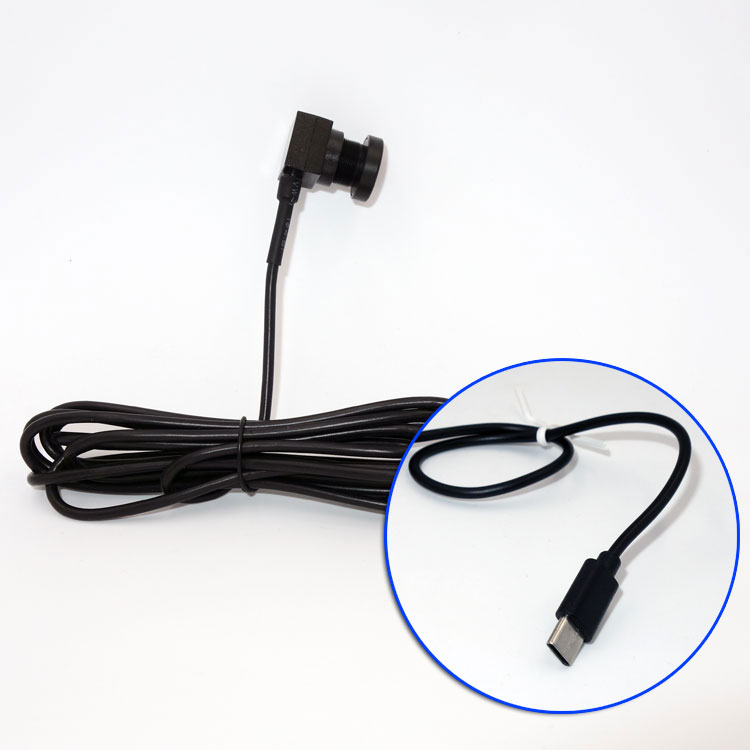
The mechanical designer says:“The PCB can fit behind the panel, but we cannot expose a normal M12 lens on the front.”
This is a mechanical problem first.
A pinhole lens can help reduce the visible front opening.
Pinhole optics involve trade-offs.
They generally require more attention to:
A small opening can also physically block the FOV.
The application needs:
A standard M12 lens may then be easier and optically more forgiving.
A “small camera” does not automatically mean that any tiny front-panel hole will work.
The opening, lens position and mounting depth need to be evaluated together.
The engineer already knows where the camera will be installed but does not yet know the correct field of view.
This is very common during prototype development.
The customer may ask:“Should we use 2.8mm, 3.6mm, 6mm or 8mm?”
Instead of ordering several fixed lenses, a 2.8–12mm manual varifocal sample can be used to find the correct view on the real equipment.
The lens is physically larger.
So it may not be suitable for:
It is also:
The final camera needs to remain extremely small and the correct FOV is already known.
In that case, a smaller fixed lens is usually better.
A very practical development workflow is: Use varifocal during prototype → determine real FOV → lock the final fixed lens for production.
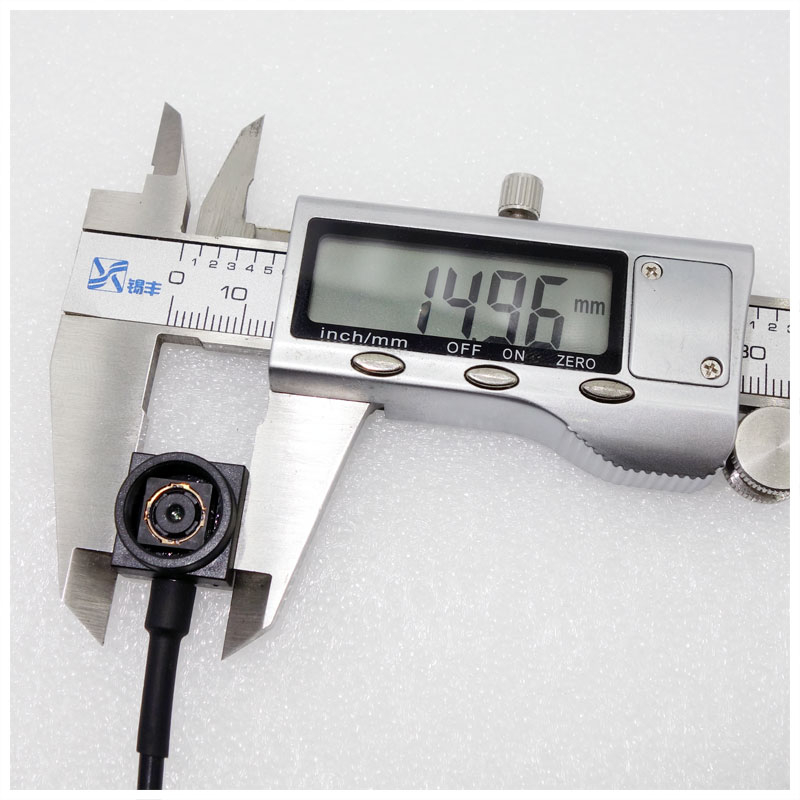
Even the normal UC-501 finished camera structure is too large.
This variant is different from a normal finished UC-501 camera.
It is: a 12×12mm 5MP bare-PCB integration option without the normal finished housing and conventional lens-holder structure.
Minimum mechanical footprint.
It gives the OEM more freedom to integrate the imaging electronics directly into its own product.
This is not a plug-and-install finished camera.
The OEM must take more responsibility for:
The customer simply needs: “A very small camera we can screw into the equipment.”
In that case, the normal finished UC-501 platform is much easier.
This should be described as: 12×12mm 5MP Bare PCB — UC-501 Family Integration Variant
rather than implying that every standard UC-501 is 12×12mm.
A major mistake in camera selection is to treat the application name as the selection rule.
For example:“We need a kiosk camera.”
That is not enough information.
A kiosk can require completely different cameras.
| Kiosk Problem | Better Starting Point |
|---|---|
| Fixed user/target distance | UC-501-2MP |
| Changing ID / QR distance | UC-501-5MP-AF |
| Strong window backlight | UC-501-WDR |
| Tiny bezel opening | 8MP Pinhole |
| Unknown FOV during prototype | 2.8–12mm Varifocal |
| Extreme internal-space restriction | 12×12mm Bare PCB |
The same logic applies to:
The problem inside the application matters more than the application label itself.
A higher-resolution camera does not automatically produce a more useful image.
The final result depends on:
Optics
Is the lens sharp enough?
Focus
Is the target actually in focus?
Working distance
Is the camera installed at the distance the lens was selected for?
Field of view
Does the target occupy enough of the frame?
Lighting
Is there enough light and manageable contrast?
Mechanical opening
Is the panel blocking the lens?
Only after these factors are correct does additional resolution become useful.
This is why a correctly configured 2MP camera can be a better industrial solution than a poorly integrated 8MP camera.
For OEM buyers, this distinction is important.
Depending on the specific UC-501 branch:
Depending on the selected model:
These should be confirmed on the exact production build:
This distinction prevents configuration options from being mistaken for universal standard specifications.
Goobuy's preferred OEM model for UC-501 is not to start every inquiry with a new camera development project.
Most real equipment problems can be solved by configuring an existing mature platform.
The normal workflow is: Mature UC-501 platform → optics → cable / connector → mounting → host validation → sample test → configuration lock → repeat production
Depending on the model:
Optics
Interface
Cable
Mechanical Arrangement
Instead of sending a 20-page technical specification, six practical inputs are usually enough to begin:
| Required Information | Example |
|---|---|
| Available camera space | 20 × 20 × 25mm |
| Camera-to-target distance | 250mm |
| Required viewing area | 300 × 200mm |
| Target | QR / label / compartment / machine component |
| Lighting | normal / backlight / low light |
| Host and USB connector | Android Type-C / Linux USB-A |
From these inputs, we can usually determine which UC-501 branch should be tested first.
For OEM equipment, sample testing should answer real installation questions rather than only confirm that the camera “turns on.”
The customer should verify:
Mechanical fit
Does the complete camera, lens and cable actually fit?
FOV
Does the camera see the required area?
Working distance
Is the target sharp at the real distance?
Lighting
Does the camera work under actual equipment lighting?
Host compatibility
Does the real Android / Windows / Linux host recognize and use the camera correctly?
Cable routing
Can the cable be installed without excessive bending or interference?
Application output
Does the image actually provide enough information for the customer's task?
Only after these are confirmed should the configuration be locked for repeat production.
Start by measuring the complete mechanical envelope, including lens height, mounting depth and cable bend space. If a normal bullet or box camera does not fit, the approximately 15×15mm Goobuy UC-501-2MP is usually the first version to evaluate. If even the normal UC-501 structure is too large, the 12×12mm 5MP bare-PCB integration variant may be considered.
Do not choose by resolution alone. A 2MP camera is often sufficient for live viewing, smart lockers, vending-machine monitoring and general equipment observation. Choose 5MP or 8MP when the target really needs more pixels, such as QR codes, labels, documents or smaller details. Lens quality, focus, working distance and lighting usually matter before extra megapixels.
If users present QR codes, ID cards or documents at changing distances, the UC-501-5MP-AF is usually a better starting point because autofocus can compensate for normal distance variation. The UC-501-8MP-AF may be considered when additional target detail or cropping is genuinely required. If the target distance is fixed, a fixed-focus camera may be simpler and more stable.
Use the UC-501-WDR when the image contains very bright and very dark areas at the same time, such as a dark foreground with a bright doorway or window behind it. WDR should not be confused with low-light performance; if the whole scene is dark, better illumination or a low-light-oriented camera may be more appropriate.
The UC-501 8MP 3.7mm pinhole configuration is intended for equipment where the camera body can remain behind the panel but the visible optical opening must stay small. Panel thickness, hole diameter, lens position and working distance must still be checked because a small opening can block the field of view or reduce image quality.
A UC-501 with a manual 2.8–12mm varifocal lens is useful during prototype validation. The engineer can adjust the FOV directly on the real equipment rather than ordering several fixed lenses. Once the preferred framing is known, the production version can remain varifocal or move to a smaller fixed-focal-length lens.
UC-501 is based on USB UVC camera platforms, but interface and host compatibility depend on the exact production configuration. Windows and Linux UVC use is generally straightforward with compatible hosts. Android requires USB host/OTG support and an application capable of opening an external UVC camera. Type-C connector shape alone does not guarantee Android camera compatibility, so the real terminal should be tested before production.
That is the preferred approach. Goobuy normally starts from an existing UC-501 platform and configures practical items such as lens/FOV, working distance, cable, connector and mounting arrangement. The recommended process is existing platform → sample validation → configuration lock → repeat production. New PCB architecture, custom ISP firmware, Android software, AI algorithms or major camera-system development should be evaluated separately rather than treated as standard UC-501 configuration.
Shenzhen Novel Electronics Limited / Goobuy supplies compact USB, AHD and rugged camera platforms for commercial equipment, industrial terminals and specialized equipment integration.
For UC-501, our focus is not to turn every inquiry into a custom R&D project.
We help OEMs and system integrators determine:Which existing camera platform fits the real space, working distance, FOV, lighting and host?
Then we configure only the parts that need to change, validate the sample on the customer's equipment and lock the proven configuration for repeat production.
Follow Me
Address:A615, 6F, Huachuangda Building, No107 Xinghua 1st Road, 43 District, Xinan street, Baoan, shenzhen, China 518101