
USB, HDMI and AHD camera modules are different industrial camera interface directions: USB cameras are best for host-based software processing, edge AI boxes, industrial PCs and embedded systems; HDMI cameras are best for direct low-latency monitor display without a PC; AHD cameras are best for local monitor kits, DVR recording, longer analog-HD cable transmission and rugged industrial equipment where simple field video is more practical than IP or USB.
Choosing a camera module is not only about the sensor.
For real industrial projects, the interface often decides whether the camera will be easy to integrate, stable in the field, useful for operators, compatible with the host system and practical for repeatable supply.
USB, HDMI and AHD are not competitors in a simple “best or worst” ranking.
They solve different engineering problems.
USB is usually the best direction when the customer already has a Windows, Linux, Android, Jetson, Raspberry Pi or embedded host device that needs software-side image processing.
HDMI is useful when the customer needs direct real-time display on a monitor without a PC or network.
AHD is useful when the customer needs simple local video, longer cable distance, lower system complexity, DVR recording, monitor kits or rugged industrial video in wet, dirty or enclosed equipment environments.
For harsh-site equipment, mining support systems, industrial vehicles, machine enclosures, pump rooms, service tools, remote cabinets and heavy industrial monitoring, the correct interface should be chosen around the host system, cable distance, display method, enclosure and final maintenance process.
This guide is written for OEMs, system integrators, equipment builders and engineering teams that need a camera-side hardware decision, not a consumer camera comparison.
| Project Requirement | Recommended Interface Direction |
|---|---|
| Existing Windows / Linux / Jetson / Raspberry Pi host | USB camera module |
| Need OpenCV, AI model input, image capture software or SDK workflow | USB camera module |
| Need 4K low-light image capture with lens selection | USB3 STARVIS camera |
| Need direct monitor display without PC | HDMI camera |
| Need operator to see real-time image on local monitor | HDMI or AHD |
| Need longer analog-style cable distance | AHD camera system |
| Need camera + monitor kit for industrial equipment | AHD camera kit |
| Need DVR recording without IP network | AHD DVR monitor kit |
| Need camera in very small inspection tool | Micro AHD camera core |
| Need wet, dusty or washdown camera head | IP69K AHD or rugged camera |
| Need thermal hot-spot monitoring | Thermal camera module |
| Need visible + thermal on vehicle or harsh platform | Dual-spectrum camera direction |
| Need complete AI smart camera with open Linux BSP | Not a standard USB/HDMI/AHD module decision |
Many buyers begin by asking for a sensor model.
But in real engineering projects, the first question should often be:
What will the camera connect to?
A camera connected to a Linux edge box is not the same product as a camera connected to a 7-inch monitor.
A camera inside a small inspection tool is not the same as a camera mounted in an IP69K wet industrial zone.
A camera for a Windows AI workstation is not the same as a camera for a service vehicle display.
A camera for thermal hot-spot detection is not the same as a visible camera for scene context.
Before selecting USB, HDMI or AHD, define:
A correct interface can reduce integration risk. A wrong interface can turn a simple camera project into a long engineering problem.
USB camera modules are the best direction when the customer already has a host device that can process the video.
Typical USB hosts include:
USB cameras are useful when the system needs:
For industrial projects, USB is often the fastest validation path when the buyer already has software and host hardware.
Recommended Goobuy direction:
<a href="https://www.okgoobuy.com/imx585-cs-usb-camera.html">Goobuy IMX585 USB3 CS-Lens Box Camera with Sony 4K STARVIS2</a>
This direction is useful when the project needs 4K low-light visible image capture, selectable CS lenses, metal housing, manual focus and an existing USB3 host.
USB is also useful for compact thermal modules when the customer needs temperature-related data or software-side analysis.
Recommended thermal direction:
<a href="https://www.okgoobuy.com/china-USB-thermal-camera-module.html">21×21mm USB-C Radiometric Thermal Camera Module with SDK</a>
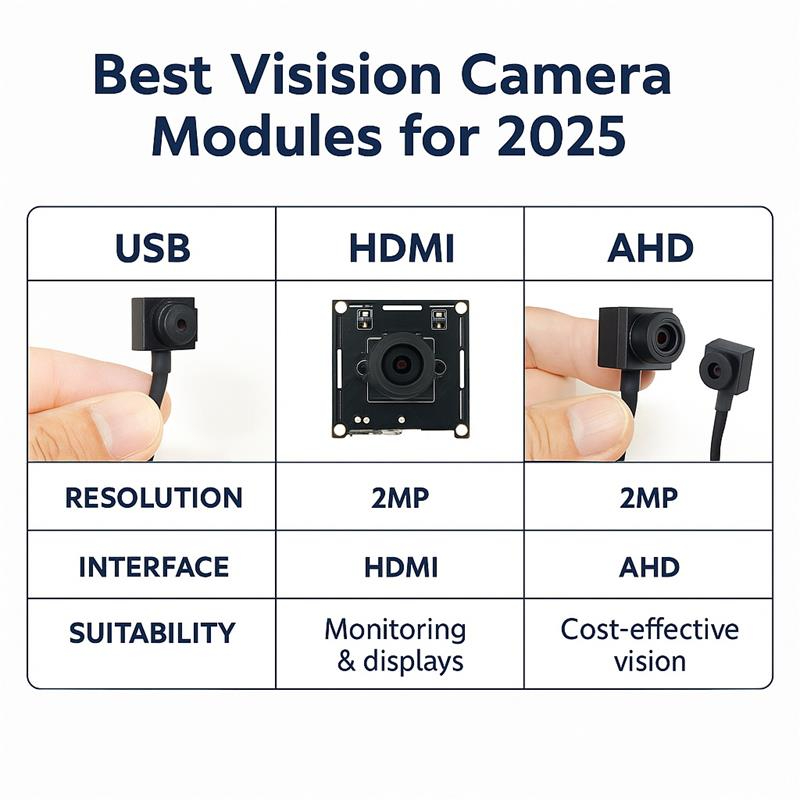
USB cameras work well when the AI processing is done on the host side.
The camera does not need to be a full AI smart camera. It can simply provide a stable image stream to the host.
This is useful for:
USB3 cameras are practical for workstations that need controlled image capture, fixed viewing distance and repeatable sample validation.
Examples include:
USB cameras can be used in harsh industrial environments when they are mounted inside a protected enclosure, equipment cabinet, terminal, machine guard or monitoring box.
They should not be treated as exposed outdoor waterproof camera heads unless the enclosure, sealing, cable and lens window are designed for the environment.
USB may not be the best choice when:
USB is strong when there is a host. Without a host, USB may create more complexity than necessary.
HDMI is useful when the project needs direct monitor output.
The main value of HDMI is simple real-time display:
camera → HDMI monitor.
This can be useful in:
HDMI is not usually the best direction when the project needs software processing, AI inference, long cable distance, compact internal wiring or rugged field deployment.
It is best when a human operator must see the image immediately and the system does not need a PC-based capture pipeline.
HDMI works when the camera must show a real-time image on a monitor.
This is useful for systems where the operator does not want to connect a laptop, open software or configure a network.
HDMI can be useful for lab-style or service-style devices where a clear image is displayed directly during adjustment, inspection or maintenance.
Some equipment builders use HDMI output during alignment, calibration or installation because it gives a simple live view.
HDMI may not be the best choice when:
HDMI is a display interface first. It is not always the best embedded vision interface.
AHD is useful when the project needs simple industrial video over cable without IP, Wi-Fi, cloud, PC software or USB distance limits.
AHD works well when the project needs:
AHD is not old-fashioned in every industrial project.
In many harsh-site applications, AHD is practical because it is simple, local and easier to service.
Recommended Goobuy micro AHD direction:
<a href="https://www.okgoobuy.com/6mm-1080P-AHD-camera-system.html">6×6mm 1080P Micro AHD Camera Core Kit for Inspection Tool OEMs</a>
Recommended waterproof AHD direction:
<a href="https://www.okgoobuy.com/Industrial-Waterproof-Camera-System.html">IP69K Waterproof AHD Camera Kit for Harsh Industrial Equipment</a>
Recommended AHD DVR direction:
<a href="https://www.okgoobuy.com/ODM-industrial-AHD-camera-system.html">Sony IMX323 AHD Camera and DVR Monitor Kit</a>
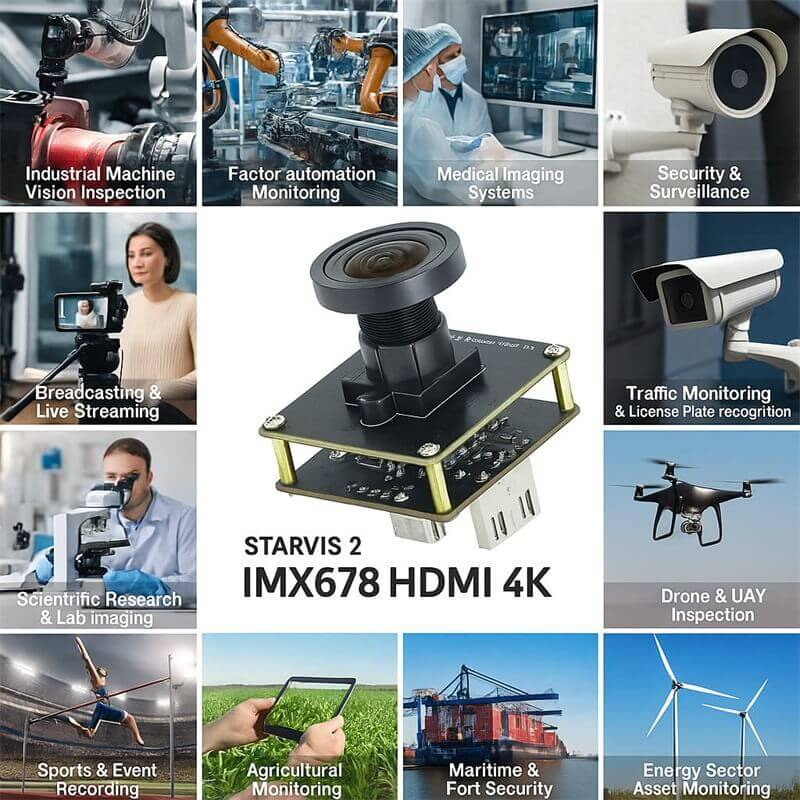
AHD is a strong direction when the customer needs a simple camera and monitor system.
Examples include:
A 6×6mm micro AHD camera core is useful when the camera head must fit into a very small space.
Examples include:
Recommended product:
<a href="https://www.okgoobuy.com/6mm-1080P-AHD-camera-system.html">6×6mm 1080P Micro AHD Camera Core Kit</a>
AHD is useful when paired with a rugged waterproof camera head.
Examples include:
Recommended product:
<a href="https://www.okgoobuy.com/Industrial-Waterproof-Camera-System.html">IP69K Waterproof AHD Camera Kit for Harsh Industrial Equipment</a>
Some projects need evidence recording without connecting to IP networks or PCs.
An AHD camera + DVR monitor kit can help record local faults, machine behavior or service events.
Recommended product:
<a href="https://www.okgoobuy.com/ODM-industrial-AHD-camera-system.html">Sony IMX323 AHD Camera and DVR Monitor Kit</a>
AHD may not be the best choice when:
AHD is practical for local video. It is not the best interface for software-heavy machine vision.
If the camera is protected inside an enclosure and connected to a host, USB can work.
If the camera needs local monitor video over a longer distance, AHD may be easier.
If the camera is directly exposed to dust, choose a rugged enclosure or IP-rated camera head.
A standard USB or HDMI camera should not be directly exposed.
A rugged IP69K AHD or rugged USB camera direction may be more suitable.
Recommended direction:
<a href="https://www.okgoobuy.com/Industrial-Waterproof-Camera-System.html">IP69K Waterproof AHD Camera Kit</a>
If the machine already has a Windows or Linux host, USB may be best.
If the machine only needs an operator display, AHD or HDMI may be simpler.
If coolant or oil spray is present, the camera head and lens window must be protected.
AHD and rugged camera systems can be practical for local monitor display.
USB may fit when there is an embedded host.
Dual-spectrum visible + thermal may be useful when the vehicle needs both scene context and heat awareness.
Recommended direction:
<a href="https://www.okgoobuy.com/dual-spectrum-vision-platform.html">Custom Dual Spectrum Vision Platform for Harsh-Site Vehicles and Energy Platforms</a>
If the project needs heat data, the question is no longer USB vs HDMI vs AHD visible camera.
The correct direction may be a thermal module.
Recommended direction:
<a href="https://www.okgoobuy.com/china-USB-thermal-camera-module.html">21×21mm USB-C Radiometric Thermal Camera Module with SDK</a>

| Selection Factor | USB Camera | HDMI Camera | AHD Camera |
| Main purpose | Host-side image capture and processing | Direct monitor display | Local analog-HD video and monitor/DVR kits |
| Best host | PC, Linux box, Jetson, embedded USB host | HDMI monitor | AHD monitor or DVR monitor |
| Software processing | Strong | Limited | Limited |
| AI input | Good if host runs AI | Not ideal | Not ideal unless converted |
| Direct display | Requires software host | Strong | Strong with monitor |
| Cable distance | Short to moderate | Short to moderate | Better for longer field cable runs |
| Field simplicity | Medium | Simple | Very simple |
| Harsh-site use | Good inside enclosure | Good for protected display systems | Good for rugged monitor kits |
| Wet/dirty zones | Needs protection | Needs protection | Better when paired with IP69K camera |
| Recording | Host-side recording | External recorder needed | DVR monitor option available |
| Best project type | Embedded vision, AI host, inspection workstation | Real-time operator display | Industrial monitor kit, service tool, local DVR |
| Not ideal for | No-host systems | AI/data processing | Software-heavy vision systems |
Choose USB when the buyer says:
Recommended product:
<a href="https://www.okgoobuy.com/imx585-cs-usb-camera.html">IMX585 USB3 CS-Lens Box Camera with Sony 4K STARVIS2</a>
Choose HDMI when the buyer says:
HDMI should be evaluated when direct display is more important than data processing.
If the project later needs recording, AI, software control or remote integration, HDMI alone may not be enough.
Choose AHD when the buyer says:
Recommended AHD products:
<a href="https://www.okgoobuy.com/6mm-1080P-AHD-camera-system.html">6×6mm Micro AHD Camera Core Kit</a>
<a href="https://www.okgoobuy.com/Industrial-Waterproof-Camera-System.html">IP69K Waterproof AHD Camera Kit</a>
<a href="https://www.okgoobuy.com/ODM-industrial-AHD-camera-system.html">AHD Camera and DVR Monitor Kit</a>
Some projects are not really USB, HDMI or AHD decisions.
Use a thermal camera module.
<a href="https://www.okgoobuy.com/china-USB-thermal-camera-module.html">21×21mm USB-C Radiometric Thermal Camera Module</a>
Use a higher-resolution thermal module.
<a href="https://www.okgoobuy.com/1280-HD-thermal-module.html">1280×1024 HD Micro USB Thermal Module</a>
Use a dual-spectrum direction.
<a href="https://www.okgoobuy.com/dual-spectrum-vision-platform.html">Custom Dual Spectrum Vision Platform for Harsh-Site Vehicles and Energy Platforms</a>
Start from a rugged camera platform.
<a href="https://www.okgoobuy.com/harsh-site-camera-modules.html">Goobuy Rugged Cameras for Harsh Environments</a>
For OEM and system integration projects, Goobuy can discuss:
Goobuy is not a full software platform supplier, complete cloud surveillance provider or open AI smart camera BSP provider.
Goobuy’s strength is camera-side hardware: sensor, lens, interface, cable, housing and practical sample validation for real OEM and system integration projects.
Before requesting a camera, define:
The correct interface becomes much clearer after these questions are answered.
USB is best when the camera connects to a host computer or embedded board for software processing. HDMI is best when the camera must display directly on a monitor with low setup complexity. AHD is best when the project needs local monitor video, DVR recording, longer cable distance or rugged camera kits in industrial equipment.
An OEM should choose a USB camera module when the product already has a Windows, Linux, Android, Jetson, Raspberry Pi or embedded USB host and needs UVC video, image capture, AI input, OpenCV processing or software-side control.
An OEM should choose an HDMI camera when the system mainly needs direct live display on a monitor without PC software, IP setup or cloud connection. HDMI is useful for operator-view tools, optical benches, service devices and visual confirmation systems.
An OEM should choose an AHD camera system when the project needs simple local video, camera + monitor kits, DVR monitor recording, longer analog-HD cable runs or rugged field viewing without IP, Wi-Fi, cloud or PC software.
AHD is not outdated when the project needs simple, local, serviceable video. In harsh industrial sites, pump rooms, machine enclosures, service tools and wet or dirty equipment, AHD can be more practical than IP or USB because it reduces network and software complexity.
USB is usually better for AI vision when the AI model runs on a host device such as a Linux box, Jetson, industrial PC or embedded board. AHD can be used for viewing and recording, but it is not the first choice when the system needs frame-level software control or direct AI processing.
HDMI can be better when the main requirement is direct live display on a monitor. USB may involve host processing and software capture. However, if the system needs AI, image capture, OpenCV, storage or control, USB is usually more useful than HDMI.
AHD is often more practical than USB for longer industrial cable runs to a local monitor or DVR. USB is better when the camera is close to the host. HDMI is usually more suitable for short-to-moderate monitor connections, not long industrial field cabling.
The interface alone does not make a camera suitable for wet or dirty environments. The camera head, housing, lens window, cable, connector and sealing matter more. For harsh wet or dirty sites, an IP69K AHD camera kit or rugged camera head may be more practical than a standard USB or HDMI camera module.
Choose thermal when the system must see heat patterns, hot spots, overheated equipment, temperature contrast or objects in darkness, fog, smoke or dust. USB, HDMI and AHD visible cameras provide scene images; thermal modules provide heat-aware visibility.
Yes. Many industrial systems combine interfaces. A vehicle platform may use AHD for local display and USB for host-side AI. A thermal system may use USB for data and CVBS for monitor output. The best architecture depends on host, display, cable length and environment.
Send the application, host device, display method, software requirement, cable length, target distance, FOV, lighting condition, indoor/outdoor environment, exposure to water or dust, recording need, sample schedule, expected quantity and customization requirement. This allows Goobuy to recommend USB, HDMI, AHD, thermal or rugged camera direction.
Follow Me
Address:A615, 6F, Huachuangda Building, No107 Xinghua 1st Road, 43 District, Xinan street, Baoan, shenzhen, China 518101