
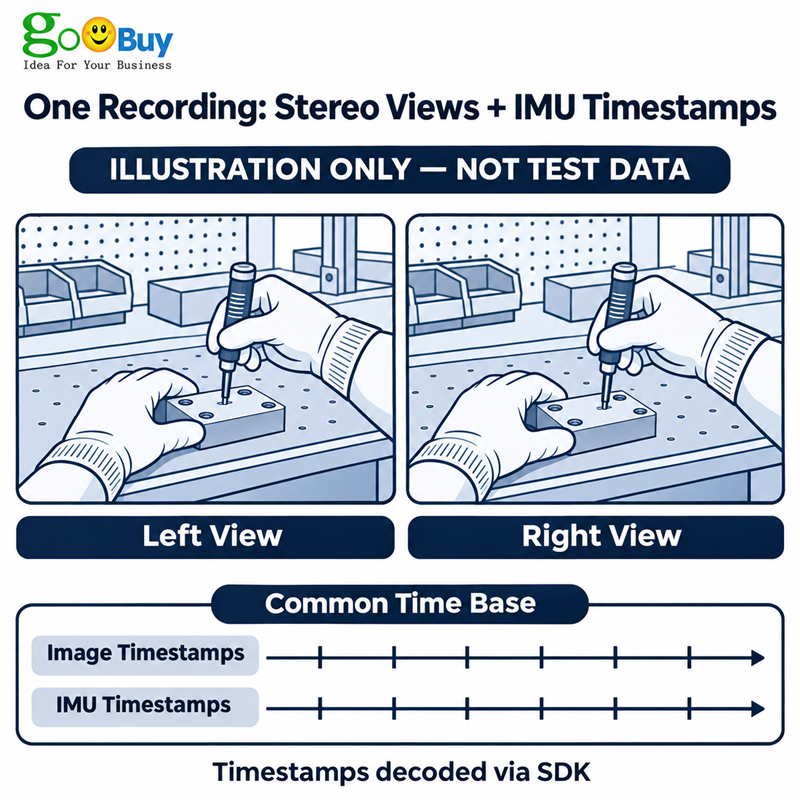
The Goobuy UC-AR0234-dual-imu is a USB-C stereo camera module for capturing human demonstrations for robot learning. Its two AR0234 color global shutter sensors use hardware-synchronized exposure, and image and IMU timestamps share a time base and can be decoded through the SDK. Goobuy supplies the module only, without a recorder or factory calibration. The buyer’s engineering team or local integration partner must handle recording integration, calibration, and testing.
For teams recording human demonstrations for robot learning on their own host.
The Goobuy UC-AR0234-dual-imu is a USB-C stereo camera module with two AR0234 color global shutter sensors and an onboard IMU. The two cameras use hardware-synchronized exposure. Image and IMU timestamps share a common time base and can be decoded using the SDK. The module is intended for teams that already have a recording host and need a stereo camera for offline recording of human demonstrations for robot learning.
Supply scope: Goobuy supplies the camera module only. It cannot record on its own. The offer does not include a recording host, battery, charger, storage, wearable mount, or recording application. There is no factory calibration, and per-unit calibration files are not supplied. Your engineering team or local integration partner must be able to integrate the module, build or adapt the recording workflow, perform calibration, and troubleshoot the system locally.
This module is a good candidate for robot learning teams, industrial demonstration data providers, and vision system integrators that have an active project, a paid sample budget, and an engineer responsible for local integration. It is most useful when the recording system is already defined and the team needs a synchronized stereo camera with IMU data.
| Application | What to validate on your own setup |
|---|---|
| First-person factory demonstrations | Record assembly, tool use, packing, or inspection from the operator’s viewpoint. Check that both eyes can see the hands, tools, and work area at the intended distance. |
| Robot manipulation training datasets | Record grasping, placing, and repositioning tasks. Check that your dataset preserves both image views and the IMU timestamps. If you derive depth, validate it in your own calibrated pipeline. |
| Fixed workstation demonstration capture | Record repeated operations from a fixed position before extending to wearable capture. Check saved frame rate, image coverage, and timestamp continuity across real recordings. |
Choose a different supplier if you need a complete battery-powered rig, factory-calibrated stereo hardware, a finished depth stream, or installation and troubleshooting performed for you. If an independent RGB or wrist camera must share the same hardware clock from day one, the standard module offer does not cover that requirement.
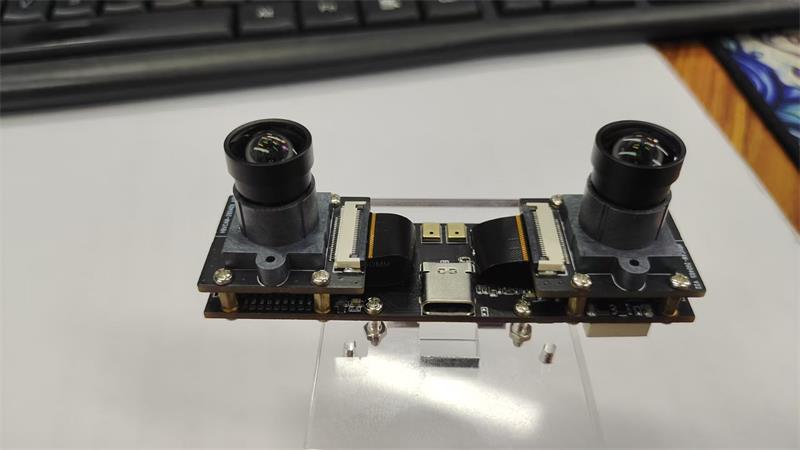
The following reference configuration uses the V44 hardware and fixed-focus lens. The video modes shown are manufacturer-listed or manufacturer-confirmed capabilities. Confirm the exact hardware, lens, and firmware revision on your sample quote before ordering.
| Item | Specification or qualification |
|---|---|
| Image sensors | Two AR0234 color CMOS sensors are not implied; the module uses two AR0234 color global shutter sensors. |
| Stereo exposure | Hardware-synchronized exposure between the left and right sensors on the same module. No numerical exposure-skew guarantee is stated. |
| MJPEG stereo mode | 3840 × 1200 at 60 fps, side by side; 1920 × 1200 per eye. |
| YUY2 stereo mode | 3840 × 1200 at 10 fps, side by side; 1920 × 1200 per eye. The 60 fps figure above applies to MJPEG. |
| 1080p per eye | The manufacturer has confirmed a 1920 × 1080 per eye at 60 fps option. Ask us to confirm the host-visible format and availability on the exact firmware quoted. |
| Host interface | USB-C connector; UVC video capture. Confirm the USB link speed and available video modes for the quoted hardware and firmware. USB-C describes the connector and does not specify the link speed. |
| IMU | STMicroelectronics LSM6DSV. Manufacturer-confirmed maximum sampling rate: 600 Hz. Confirm the actual exported sample rate for your selected configuration. |
| Image and IMU timing | Hardware timestamps use a common time base. The SDK is used to decode image and IMU timestamps. Your recorder must retain them for later alignment. |
| Reference lens | Fixed-focus configuration; 3.25 mm, F2.6, 100° diagonal field of view. The 100° figure is not horizontal FOV. |
| Horizontal FOV and overlap | A horizontal FOV or rectified stereo overlap value is not specified here. If either is a pass/fail requirement, define the working distance and required coverage before ordering. |
| Power | USB bus powered, 5 V DC ±5% per the V44 specification. Confirm module current draw in the intended recording mode if you have a fixed power budget. |
| Module dimensions | 85 × 25 × 31.6 mm nominal for the V44 reference configuration. Use the matching mechanical drawing for tolerances, mounting points, and clearance. |
| Calibration and depth | No factory calibration or per-unit calibration files. No finished depth output. Local calibration and depth processing are the buyer’s responsibility. |
What the host sees matters. A side-by-side 3840 × 1200 frame is one combined stereo image. It is not a 3840-pixel-wide image from each eye. Likewise, listing a 60 fps camera mode does not establish that your application can record both views and the IMU continuously at the intended rate. Verify the saved output on the host you will use in the field.
| Timing question | What you should expect |
|---|---|
| Do the two onboard cameras expose together? | Yes. The left and right sensors on the module use hardware-synchronized exposure. |
| How do I align a frame with IMU data? | Decode the timestamps through the SDK and preserve them in your recording. The shared time base lets your software associate image frames with the relevant IMU samples. It does not mean every IMU sample corresponds to a separate video frame. |
| Can I add a wrist camera to the same clock? | External camera synchronization is outside the standard module offer. A shared USB hub does not synchronize sensor exposures. If additional cameras are essential, agree on the synchronization responsibility before you buy. |
Timing and calibration solve different problems. Timing tells your recorder when a frame or IMU sample was captured. Calibration tells your software how each camera images the scene and how the cameras are positioned relative to each other. If your workflow also depends on the IMU’s position and orientation relative to the cameras, your team must perform that spatial calibration as well. Do this in your final mounting configuration and validate the result at the distances you actually use.
Before ordering, define one task that the sample must record successfully. For example: a worker picks up a tool, handles a part, and puts it down, with both hands visible in the two camera views.
Record the complete task on your selected host. Save both views and the decoded IMU timestamps. Replay the recording to verify the saved format and frame rate, and check for missing frames or gaps in the IMU log.
Check coverage where the work happens. Move the hands and tool through the near, far, and edge positions. If your software rectifies the images, check the common view after rectification.
Calibrate in the final mount. Validate the result with your own target and acceptance criteria. If your recorder is battery-powered, measure current draw and runtime on the complete setup, including the host and storage.
For a technical review, tell us which documents or sample data you need: the mode table, mechanical drawing, SDK information, or a stereo clip with a corresponding IMU log. We will confirm what is available for the exact configuration quoted. A recording from a different lens or firmware revision should not be used as acceptance evidence for your order.
If your team can run that test independently, see the UC-AR0234-dual-imu stereo camera module. For a paid sample quote, tell us what task you need to record, your sample quantity and target delivery date, your recording host, and who will handle integration and calibration locally. Include your required per-eye resolution, frame rate, and horizontal field of view, and flag any mandatory external camera synchronization before ordering.
Discuss a Camera Configuration. If the existing module is close but you need a different lens, cable arrangement, or mounting fit, send a drawing or dimensions, identify the required changes, and include your pilot quantity and target date. If the change needs engineering work, we can first assess whether it is feasible. Any non-recurring engineering fee (NRE), minimum quantity, schedule, deliverables, and acceptance criteria are agreed separately before work starts. The scope remains the camera module; recording system development, local commissioning, and calibration remain with your team.
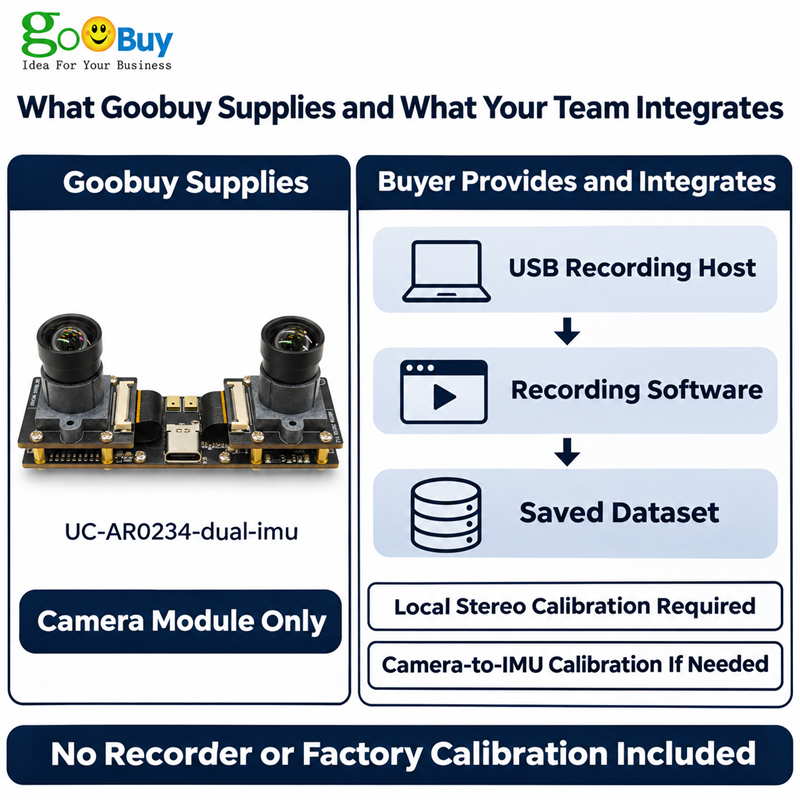
Yes, if your team already has a recording host and can integrate the video and IMU data. Typical uses include first-person recording of factory operations, tool handling, and robot manipulation demonstrations. The module supplies synchronized stereo images and timestamped IMU data. Your team owns recording, calibration, annotation, and dataset preparation. It is not a complete wearable recording rig.
The module captures both eyes simultaneously. The V44 specification lists 3840 × 1200 at 60 fps in MJPEG as a side-by-side stream, equivalent to 1920 × 1200 per eye. It lists the same combined resolution at 10 fps in YUY2. If your application specifically requires 1920 × 1080 per eye, ask us to confirm that mode, the format presented to your host, and the firmware revision before ordering. Validate the saved recording on your own host.
The two onboard AR0234 sensors use hardware-synchronized exposure. Image and IMU data use hardware timestamps on a common time base, which can be decoded through the SDK. If your dataset has a maximum allowed timing error, specify it before ordering and verify it in your recording workflow. The standard specification does not state a measured end-to-end timing error for your host and recorder.
The standard offer covers synchronization within the dual-camera module. It does not include hardware synchronization with separate RGB, wrist, or third-person cameras. If your dataset requires simultaneous exposure across separate devices, treat that as a separate system requirement. If your application only needs alignment after capture, your team must verify that the timestamps from both devices are usable for that purpose.
100° is the diagonal FOV of the reference lens, not the horizontal angle or the shared stereo view. Whether both hands fit depends on working distance, mounting angle, and the area visible to both cameras. If you have a horizontal FOV target or need both cameras to cover a specific work area, send the width and height you must see at your closest working distance. Verify coverage after rectification if your workflow uses it.
No. Goobuy does not provide factory calibration or per-unit calibration files, and the module does not output a finished depth map. Your engineering team or local integration partner must calibrate the stereo cameras in the final installation and perform camera-to-IMU spatial calibration if needed. If you need usable depth or individual calibration files on delivery, this is not the right product.
The module uses UVC for video and the SDK for timestamp decoding. Linux teams should verify video capture, SDK compatibility with their host architecture and OS, and continuous recording under the intended load. Check the actual USB link speed and modes for the quoted version. The module takes power from the USB bus; a battery can power a suitable recording setup, but the module still needs a host and cannot record directly to a power bank. Goobuy does not supply the battery, host, or recorder.
Yes. Start by asking for a quote for the existing configuration and defining what the sample must pass on your system. If a lens, cable, or mechanical fit needs to change, send the drawing or measurable requirements, pilot quantity, and target date. We can review feasible changes to the camera module and agree on any NRE and acceptance criteria before development. For sample or custom orders, confirm the return terms in the quote before payment; do not assume that a sample can be returned because local integration, calibration, or software development did not succeed.
Follow Me
Address:A615, 6F, Huachuangda Building, No107 Xinghua 1st Road, 43 District, Xinan street, Baoan, shenzhen, China 518101